

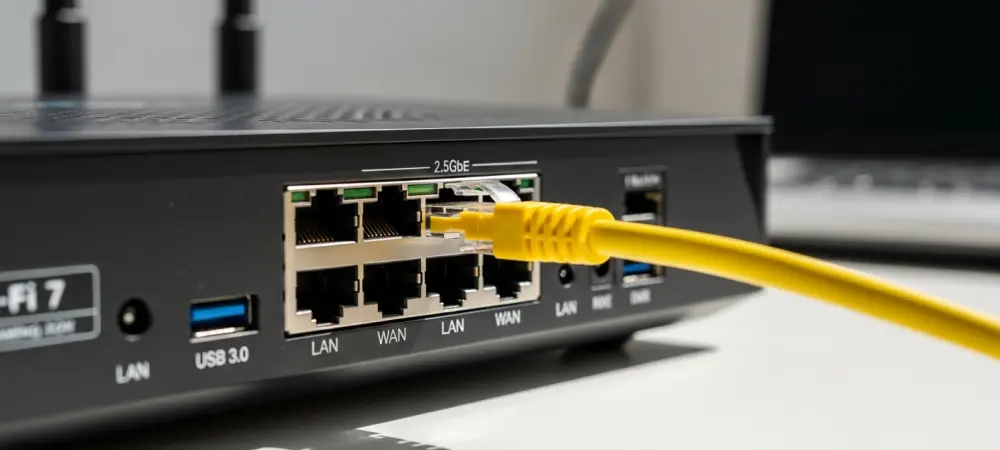
High-performance online gaming environments increasingly demand network stability that traditional hardware struggles to maintain as bandwidth requirements for modern titles continue to skyrocket. As more households transition to high-speed fiber connections and data-heavy streaming services, the necessity for hardware that can manage massive data throughput without introducing latency has become paramount. The TP-Link Archer GE400 emerges as a strategic entry into this landscape, offering the latest Wi-Fi 7 capabilities at a price point that challenges more expensive competitors. While many flagship routers carry high costs that deter the average consumer, this model serves as a bridge for those seeking the benefits of the newest wireless standards without overextending their budgets. By focusing on essential gaming features and robust wired connectivity, the device provides a pathway for users to upgrade their home networks to support the demands of 2026 hardware and beyond. It represents a shift in the industry where cutting-edge technology is no longer reserved exclusively for high-end enthusiasts, making advanced networking more accessible to the general public.
1. Strategic Market Value and Competitive Comparison
The retail landscape for networking gear has shifted significantly, with the TP-Link Archer GE400 positioned as a specialized solution for budget-conscious gamers who prioritize performance over redundant features. With a standard retail price of $219.99, the router frequently appears on sale for approximately $169, placing it in a highly competitive bracket that few other Wi-Fi 7 devices currently occupy. This aggressive pricing strategy allows the manufacturer to capture a demographic that might otherwise remain on older Wi-Fi 6 or 6E standards due to the high entry cost of newer technology. When evaluating its value proposition, it is essential to look at how it sits within the broader product lineup. It serves as a more affordable alternative to the Archer GE650, which provides tri-band support and includes a 6GHz radio. While the GE400 sacrifices that third band, it retains the core Wi-Fi 7 optimizations that improve overall network efficiency and reduce interference in crowded environments, making it a pragmatic choice for many.
Choosing between the GE400 and its more expensive siblings often comes down to the specific wireless environment of the user. The absence of the 6GHz band in the GE400 means it operates solely on the 2.4GHz and 5GHz frequencies, which might be a concern for those living in dense apartment complexes where those bands are heavily congested. However, for users in typical residential settings, the dual-band BE6500 configuration remains exceptionally capable, especially when utilizing Multi-Link Operation (MLO). This technology allows compatible devices to send and receive data across different frequency bands simultaneously, which effectively mitigates the lack of a dedicated 6GHz lane for many use cases. Furthermore, the inclusion of 4K QAM and OFDMA ensures that every bit of available spectrum is used with maximum efficiency. By omitting the expensive 6GHz hardware, the manufacturer has managed to deliver a router that excels in wired performance and gaming-specific software while maintaining a price that remains attractive to a wide range of consumers looking for a reliable upgrade.
2. Physical Design Elements and Status Communication
The aesthetic profile of the Archer GE400 reflects its gaming pedigree without becoming overly bulky or intrusive in a typical home office setup. The device features a compact black housing with dimensions measuring 2.3 by 10.5 by 6.0 inches, allowing it to fit easily onto a desk or be mounted to a wall using integrated brackets. Its beveled edges and matte finish are complemented by an integrated RGB LED strip that runs across the front, providing the “gaming” look that many enthusiasts appreciate. This lighting is not merely decorative; it serves as a functional interface for the user to understand the current state of their network at a glance. Six fixed antennas are strategically distributed around the chassis to ensure broad signal coverage throughout the home. Unlike some high-end routers that use internal or collapsible antennas, these fixed external units are optimized for maximum reach and stability, though they do increase the overall footprint of the device when fully deployed.
Monitoring the health and status of the connection is made intuitive through a series of color-coded LED alerts. During the initial startup phase, the router displays red and blue lights to indicate the boot sequence is in progress. Once active, the lighting transitions to signify various operational states. A blinking red light warns of a total loss of internet access, while a blinking orange light indicates that the wireless signal has been manually or automatically deactivated. If the system detects that both the wireless radio is off and no internet connection is present, the LED strip will blink yellow. System firmware updates, which are critical for maintaining security and performance, are signaled by a blinking blue light. Under normal operating conditions, the light remains steady, though users have the option to customize the color and effects through the management software. This level of visual feedback reduces the need for constant troubleshooting via the mobile app, as the hardware itself communicates its status effectively.
3. Hardware Architecture and Connectivity Options
Inside the chassis, the Archer GE400 is powered by a quad-core processor clocked at 2GHz, which is supported by 1GB of RAM and 256MB of flash memory for firmware storage. This processing power is crucial for a Wi-Fi 7 router, as the protocol introduces complex data management tasks like Multi-Link Operation and advanced encryption that require significant overhead. The hardware is designed to handle high-bandwidth tasks simultaneously, such as 4K streaming on one device while another is engaged in low-latency gaming. The dual-band BE6500 wireless technology ensures that the router can push significant speeds across both the 2.4GHz and 5GHz bands. While it lacks 320MHz channel support, it utilizes 4K QAM to squeeze more data into the existing 160MHz channels, providing a noticeable speed boost over previous generations. This internal architecture ensures that the router remains responsive even when multiple users are taxing the network, preventing the “bottlenecking” effect often seen in cheaper, underpowered networking equipment.
The rear panel of the router reveals a port configuration that is specifically tailored to modern gaming and high-speed internet tiers. It features one 2.5GbE WAN port to accommodate multi-gigabit fiber connections, ensuring that the router does not become a bottleneck for the incoming signal. For local connectivity, there is a dedicated 2.5GbE LAN port that is prioritized for gaming traffic, allowing a PC or console to maintain the highest possible speeds and lowest latency. Additionally, three 1GbE LAN ports are available for other wired peripherals like smart home hubs or printers. A single USB 3.0 port provides the capability to attach external storage, transforming the router into a basic network-attached storage (NAS) device for file sharing across the local network. This combination of multi-gigabit wired support and specialized gaming ports makes the GE400 a versatile hub for a modern digital home, particularly for users who prefer wired connections for their primary gaming stations to ensure the most stable experience.
4. Software Suite and Performance Optimization
Managing the Archer GE400 is a streamlined experience, as users can choose between the TP-Link Tether mobile application or a traditional web browser interface. The software includes a dedicated Game Center, which serves as a central hub for various performance-enhancing tools. Within this suite, the Game Boost feature allows users to prioritize gaming traffic with a single click, ensuring that background downloads or streaming do not interfere with online matches. Another significant addition is the inclusion of WTFast, which provides access to a Gamers Private Network (GPN). This service optimizes the routing of data packets between the player and the game server, potentially reducing ping and eliminating jitter by finding the shortest and least congested path through the internet. For advanced users and console players, the port forwarding configuration is simplified, making it easy to achieve an “Open NAT” status, which is often required for seamless multiplayer connectivity and hosting.
Beyond gaming features, the router includes the HomeShield security ecosystem, which provides layers of protection for every connected device on the network. The basic tier of HomeShield is free and offers essential services like network security scanning to identify vulnerabilities and basic parental controls. These controls allow parents to set up content filters and bedtime schedules to manage the digital habits of younger users. For those requiring more robust security, a premium subscription service is available, which adds advanced features such as real-time malware protection, IoT device shielding, and more detailed time management reports. This dual-layered approach allows users to decide how much control and protection they need without forcing a paid subscription for basic functionality. The integration of these tools into a single, user-friendly interface ensures that even those without deep technical knowledge can maintain a secure and optimized home network environment.
5. Sequential Guide for Router Installation
Setting up the Archer GE400 is designed to be a straightforward process that minimizes downtime for the home network. 1. Launch the mobile application: Open the TP-Link Tether app on your smartphone to begin the guided process. 2. Initiate device setup: Press the plus (+) icon located in the top-right corner of the app’s main screen. 3. Choose the hardware type: Select the option to add a new device from the menu that appears. 4. Pick the category: Choose “Router” from the list of available hardware types to ensure the correct configuration flow. 5. Observe the indicator light: Wait until the LED strip on the front of the hardware starts flashing red, indicating it is ready for pairing. 6. Capture the device ID: Use your phone’s camera to scan the QR code found on the base of the router to identify the specific unit. This automated step helps avoid manual input errors and speeds up the connection between the phone and the new hardware.
The remaining steps involve physical connections and final software adjustments to secure the network. 7. Begin configuration: Select the option to set up the detected device within the application interface. 8. Link to the internet source: Plug the router into your existing modem using the provided high-speed Ethernet cables. 9. Power cycle the modem: Turn your modem off and back on to establish a fresh connection and allow it to assign an IP address to the new router. 10. Secure the hardware: Establish a new administrative password for the router itself to prevent unauthorized access to the settings. 11. Define wireless credentials: Choose a unique name (SSID) and a strong password for your Wi-Fi network to protect your data. 12. Finalize the setup: Save all changes to complete the activation and allow the router to reboot into its operational state. Following these steps ensures that the device is properly integrated with the internet service provider and that all security features are active from the first moment of use.
6. Real-World Speed and Coverage Analysis
Testing the Archer GE400 reveals strong performance metrics that validate its position as a high-value gaming router. In close-range scenarios, the 5GHz band delivers impressive throughput that rivals many more expensive tri-band models, particularly when using Wi-Fi 7 compatible clients. The 2.4GHz band also shows significant improvement over previous generations, providing a stable and fast connection for older devices and smart home gear. File transfer speeds were excellent, leading its specific price class and making it a viable option for users who want to share media or back up documents across their local network without investing in a dedicated NAS. These results indicate that while the GE400 may be a “budget” Wi-Fi 7 option, it does not compromise on the raw speed required for modern high-definition entertainment and large file downloads.
Signal distribution and range are generally reliable for standard residential layouts, though the laws of physics still apply to the higher frequency bands. The 2.4GHz signal maintains a strong presence throughout most homes, penetrating walls and floors with minimal degradation. However, the 5GHz signal, while fast, tends to drop off more noticeably in distant areas such as garages, basements, or far corners of the yard. This is expected behavior for a router without an auxiliary 6GHz band to offload traffic, but it is something users with larger properties should consider. For most medium-sized homes, the six fixed antennas provide sufficient coverage to eliminate dead zones in primary living areas. While it might fall slightly short of the massive coverage areas advertised by premium tri-band mesh systems, the GE400 remains a formidable performer for single-unit deployments, especially when positioned centrally within the residence to maximize the reach of its 5GHz radio.
7. Strategic Implementation for Modern Networks
The TP-Link Archer GE400 established itself as a highly capable entry point into the world of Wi-Fi 7 during extensive testing and evaluation. It successfully balanced the need for cutting-edge features with the financial constraints of the average consumer, proving that high-speed gaming connectivity did not require a massive investment. The inclusion of a dedicated 2.5GbE gaming port and advanced software like WTFast provided tangible benefits for enthusiasts who demanded low latency and prioritized traffic management. While the lack of a 6GHz band was a noted omission, the overall performance on the 5GHz and 2.4GHz frequencies remained robust enough for the majority of residential applications. Testing confirmed that the device handled heavy workloads with ease, maintaining stability even when multiple high-bandwidth streams were active simultaneously. The straightforward installation process and the intuitive nature of the Tether app further enhanced the user experience, making the transition to new hardware seamless. For those considering a network upgrade, the Archer GE400 represents a sensible choice, particularly when it is found at its discounted price point. Users who lived in extremely congested wireless environments might have found the Archer GE650 to be a better long-term investment due to its 6GHz support, but for everyone else, the GE400 offered a nearly identical experience in wired and standard wireless tasks. Actionable next steps for potential buyers should include assessing the current speeds provided by their internet service provider to ensure they can take full advantage of the 2.5GbE WAN port. Additionally, centralizing the router within the home is recommended to mitigate the range limitations of the 5GHz band. As the industry moves further into the Wi-Fi 7 era, this router served as a clear indicator that the technology has matured enough to reach a wider audience. It stood as a reliable, fast, and feature-rich solution that addressed the core needs of the modern gaming community without unnecessary complexity.