

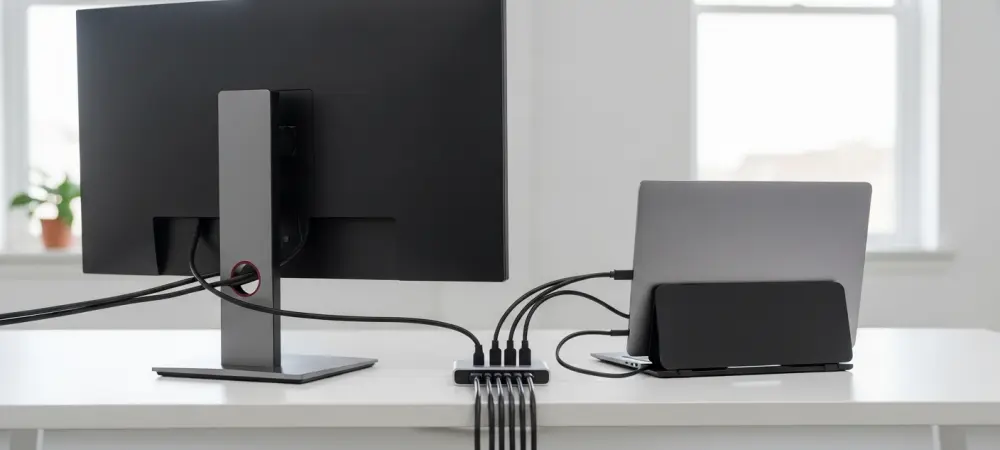
The relentless evolution of ultra-thin mobile hardware has inadvertently forced a compromise where raw processing power must contend with a drastic reduction in physical connectivity options. While the latest iterations of the MacBook Air M3 and the Asus ProArt PZ14 deliver performance that rivals traditional towers, the “port rationing” prevalent in modern laptop design often leaves users struggling to connect even basic peripherals. Bridging this divide requires more than simple adapters; it necessitates sophisticated connectivity solutions that can manage high-bandwidth data, advanced video signals, and significant power delivery through a single interface.
Bridging the Gap Between Portability and Desktop Workstations
The current trend toward minimalist industrial design has led manufacturers like Apple and Asus to prioritize thinness and battery life, often at the direct expense of physical utility. For instance, the MacBook Pro offers incredible efficiency, yet users frequently find themselves restricted by a limited number of USB-C ports when attempting to build a multi-monitor or high-speed storage environment. This shift has given rise to a new category of “pro-sumer” hardware, such as the Plugable USBC-10IN1E, designed specifically to expand the functionality of these port-limited devices. By utilizing a single host port, these hubs attempt to replicate the expansive connectivity of a full desktop motherboard, allowing a mobile device to function as the brain of a complex office or creative studio.
Integration in the modern hybrid work landscape is no longer about just adding extra USB slots; it is about the quality and speed of those connections. Creative professionals and power users now depend on high-bandwidth peripherals, such as external NVMe storage and high-resolution displays, to maintain their productivity. The transition from a standalone tablet like the Asus ProArt PZ14 to an integrated desktop workstation must be fluid and reliable. Advanced docking solutions aim to provide this continuity, ensuring that a professional can walk into an office, plug in one cable, and immediately have access to a 2.5GbE network, multiple storage drives, and high-refresh-rate monitors without sacrificing the portability of their primary machine.
Modern connectivity solutions must act as a central nervous system for the workspace, balancing the energy and data requirements of a dozen different devices simultaneously. The evolution of this technology reflects a broader industry shift toward the “single-cable setup,” where the distinction between a mobile device and a desktop becomes increasingly blurred. This integration is essential for professionals who find themselves editing 4K video on a train one hour and presenting that same footage on an 8K display in a boardroom the next. High-quality hubs from industry leaders like Plugable provide the necessary architecture to make these transitions possible, effectively mitigating the constraints imposed by thin-and-light laptop designs.
Technical Performance and Integration Capabilities
High-Speed Data Throughput and Networking Standards
At the heart of any high-performance connectivity solution is the underlying architecture that dictates how fast data can move between the host and its peripherals. The Plugable USBC-10IN1E utilizes a USB 3.2 Gen 2 architecture, which provides a theoretical maximum bandwidth of 10Gbps. This standard is crucial for maintaining performance across multiple devices, as it allows for the rapid transfer of large files that would otherwise crawl on older 5Gbps systems. When compared to basic travel hubs, this 10Gbps pipeline ensures that high-speed external drives, such as the Crucial X10 SSD, can operate near their peak capabilities, providing a desktop-class experience in a portable form factor.
Networking performance has also seen a significant leap with the introduction of 2.5GbE Ethernet ports on premium hubs. While standard 1GbE connections have been the norm for over a decade, the rise of Network Attached Storage (NAS) systems from brands like UGREEN has necessitated faster wired speeds. A 2.5GbE port effectively doubles the potential networking throughput, which is vital for users who edit high-resolution media directly from a server or move massive datasets across an office intranet. Real-world metrics show that a 2.5GbE connection can achieve transfer speeds of approximately 150MB/s, a substantial improvement over the roughly 110MB/s limit seen on standard gigabit connections.
Maintaining consistent bandwidth during heavy data loads requires more than just raw speed; it requires intelligent management of data channels. Premium hubs often employ separate controller channels for video and networking data, utilizing DisplayPort Alt Mode for the former. By isolating these high-bandwidth streams, a well-engineered hub can maintain a stable 10Gbps throughput for data ports even while the 2.5GbE Ethernet port is fully saturated, providing a reliability level typically reserved for internal desktop components.
Advanced Visual Fidelity and Display Output
The transition to high-resolution displays is a cornerstone of professional productivity, and the latest connectivity standards are designed to support this demand. The inclusion of HDMI 2.1 in modern docking solutions allows for unprecedented visual fidelity, supporting 4K resolutions at refresh rates as high as 144Hz. For those working with even higher pixel densities, these systems can output 8K resolution at 30Hz, provided the host hardware is compatible. This level of performance is particularly important for creative roles where color accuracy and motion clarity are paramount, as well as for power users who demand the smooth visual experience of high-refresh-rate monitors during long work sessions.
To achieve these advanced display specifications, the host machine must support specific technologies like DisplayPort 1.4 with Display Stream Compression (DSC). This requirement is generally met by newer hardware, such as 12th Gen Intel-based PCs or Apple laptops featuring M1 Pro, M1 Max, or M3 chips. Without DSC, the available bandwidth of a USB-C port is often insufficient to drive a 4K 144Hz signal, highlighting the importance of matching the hub’s capabilities with the host’s hardware profile. When these technologies align, the resulting visual stability is comparable to a direct GPU connection, eliminating the flickering or resolution drops common in lower-tier adapters.
The difference in visual performance between standard HDMI 2.0 and the newer HDMI 2.1 standard is transformative for both productivity and high-performance gaming. While older hubs might struggle to maintain a stable 4K 60Hz signal, the extra headroom provided by HDMI 2.1 ensures that users can utilize the full potential of high-end gaming monitors or professional color-grading displays. This technical capability allows a mobile device like a MacBook Pro to serve as a legitimate gaming or editing workstation when docked, providing a level of immersion and detail that was previously exclusive to dedicated desktop computers with discrete graphics cards.
Power Management and Charging Efficiency
Managing power is perhaps the most critical task of any docking station that aims to replace a desktop setup. The latest USB-C Power Delivery (PD) 3.1 EPR standards allow for significantly higher wattage than previous generations, which is essential for keeping high-performance laptops charged under heavy workloads. With support for up to 140W of input, advanced hubs can deliver approximately 125W of output directly to the host device. This ensures that even when a MacBook Pro is rendering complex 3D scenes or exporting high-bitrate video, the battery remains at peak health and does not drain despite being under a heavy load.
The efficiency of this power passthrough is a major differentiator in the market. Many budget-friendly hubs cap out at 60W or 85W of power delivery, which may not be enough to sustain a professional laptop during intensive tasks, leading to the dreaded “slow discharge” while plugged in. By providing 125W of output, the Plugable 10-in-1 allows users to rely on a single connection for both data and power, simplifying the workspace and reducing the wear on the laptop’s own ports. This high-wattage capacity also provides enough “overhead” to power the hub’s internal electronics and several bus-powered peripherals without compromising the charging speed of the laptop.
There is a delicate balance, however, between the convenience of bus-powered peripherals and the energy requirements of the host. High-speed external drives like the Crucial X10 SSD draw considerable power from the hub, and if too many energy-hungry devices are connected simultaneously, it can strain the system. In a workstation environment, the hub must intelligently distribute power to ensure that critical peripherals remain stable while the host continues to charge. This sophisticated power management is what separates a professional docking solution from a simple USB port expander, providing the reliability necessary for long-term desktop use in a professional setting.
Practical Constraints and Real-World Implementation Challenges
Despite the impressive theoretical speeds of modern hubs, real-world application often reveals a “bandwidth pipe” limitation that users must navigate. Because the entire device typically shares a single 10Gbps stream for its USB data ports and SD card slots, connecting multiple high-speed devices simultaneously will lead to shared bandwidth. If a user is transferring large files from a 10Gbps SSD while also offloading footage from an SD card, the speed of each individual transfer will naturally decrease. This bottleneck is a physical reality of current USB 3.2 Gen 2 technology, requiring users to prioritize their workflows or accept slightly slower speeds when every port is occupied.
One of the most notable trade-offs in the current market of 10Gbps hubs is the choice of SD card reader standards. For example, some professional-grade hubs like the Plugable 10-in-1 utilize the UHS-I standard instead of the faster UHS-II. For photographers or videographers using high-end Sony or Canon cameras, this creates a significant bottleneck, as UHS-I maxes out at approximately 104MB/s, whereas UHS-II can reach speeds of 312MB/s. This decision often forces a choice: users must decide whether they value the faster networking and video of one model over the specialized high-speed card offloading of another, such as Plugable’s own 9-in-1 model which includes UHS-II support.
Power-draw issues also present a challenge when dealing with high-capacity external storage. While modern hubs are robust, certain “bus-powered” drives from brands like LaCie or Seagate can have power requirements that exceed what a single hub port can provide, especially if other ports are also occupied. In these instances, the peripheral may fail to mount or could disconnect during a file transfer. Professional users often find that while a hub can handle most tasks, exceptionally high-draw devices still occasionally require a direct connection to the laptop’s primary port to ensure total stability, highlighting the remaining gap between a portable hub and a dedicated, mains-powered docking station.
Thermal management is another critical factor that users must consider when pushing a hub to its technical limits. When a device is handling 125W of power passthrough while simultaneously routing 10Gbps of data and a 4K 144Hz video signal, it generates a significant amount of heat. Premium hubs utilize aluminum chassis designs to act as passive heat sinks, dissipating this thermal energy into the surrounding air. While the exterior of the hub may become warm to the touch, this is a sign that the cooling system is working correctly to protect the internal components. However, users must ensure the hub is placed in a well-ventilated area to prevent thermal throttling, which could otherwise reduce data transfer speeds during prolonged use.
Strategic Recommendations for Hardware Selection
For users looking to transform a port-limited device like the Asus ProArt PZ14 into a comprehensive workstation, the Plugable USBC-10IN1E stands out as a top-tier choice. It provides the necessary density of connections—including five USB ports, 2.5GbE, and HDMI 2.1—to handle almost any standard office or creative setup with a single cable. This specific model is ideal for those who prioritize a fast wired network and high-refresh-rate displays. Its ability to charge the host at 125W makes it one of the most capable portable hubs available, effectively future-proofing a workspace against the increasing power demands of next-generation mobile hardware.
Guidance for hybrid users often comes down to the specific requirements of their primary media. If the workflow involves heavy network-based editing on a NAS or requires the smoothest possible video output for a high-end monitor, the 10-in-1 model is the superior selection due to its 2.5GbE and HDMI 2.1 features. However, if a user is primarily a photographer who spends hours offloading RAW files from UHS-II SD cards, they might find more value in a specialized 9-in-1 model that sacrifices some networking speed for faster card reader performance. Choosing between these options requires an honest assessment of which bottleneck—network speed or card reader speed—is more detrimental to daily productivity.
Ultimately, the choice of a docking solution should be dictated by the specific use case and the existing infrastructure of the user’s environment. High-speed network editing and multi-peripheral office setups benefit most from the premium bandwidth management found in high-end USB-C hubs. For the professional who needs a “one-cable” solution that they can also throw into a travel bag, these advanced hubs offer the perfect middle ground between the mobility of a laptop and the raw power of a desktop. By understanding the technical limitations and performance peaks of these devices, users can make an informed decision that ensures their mobile computing setup never feels like a compromise when they return to their desk.
The historical shift toward a more integrated and flexible computing environment reached a significant milestone as professionals successfully utilized high-bandwidth hubs to bridge the gap between their mobile and stationary workflows. Users recognized that the strategic selection of hardware, focusing on standards like HDMI 2.1 and 2.5GbE, allowed them to maintain a competitive edge despite the physical limitations of modern laptop designs. By adopting these advanced connectivity solutions, the modern worker moved closer to a truly unified computing experience. Future considerations now involve the integration of even higher power delivery standards and the potential for Thunderbolt 5 to further expand the capabilities of a single-cable workstation. The reliance on external docking solutions became a standard practice, ensuring that portability no longer dictated a sacrifice in professional performance.