

Despite the rapid advancement of PCIe 5.0 and NVMe speeds, the humble USB 2.0 header remains an essential component for any build that prioritizes real-time hardware customization and telemetry. While enthusiasts often focus on the flashy capabilities of Thunderbolt 5 or the blistering transfer rates of external USB 4 Gen 2×2 ports, the motherboard’s internal nine-pin connector is the unsung hero of system integration. This specific interface has transitioned from being a simple connector for front-panel chassis ports into a sophisticated data gateway that powers the most intelligent components of a modern rig. In the current landscape of custom PC assembly, neglecting these headers often leads to a significant loss in system functionality, as they are no longer just for legacy accessories but are integral to the ecosystem of “smart” hardware. The versatility of this port stems from its standardized nature and the low-overhead communication it provides between the operating system and the physical hardware. For builders who aim to create a machine that is as much a piece of functional art as it is a computational powerhouse, understanding the depth of this header’s utility is a fundamental requirement for success in the high-end market.
The Physical Layout: Understanding the Nine-Pin Architecture
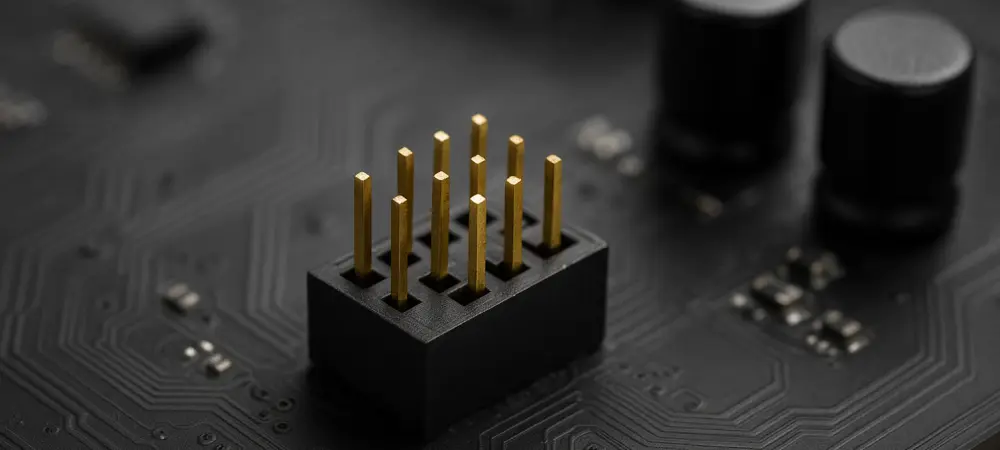
The internal USB 2.0 header is easily recognizable on a motherboard by its distinct nine-pin layout, which is typically arranged in two rows of five pins with one pin intentionally missing. This missing pin serves as a “key,” a mechanical safeguard that prevents the user from plugging in a connector in the wrong orientation, which could lead to disastrous electrical shorts. Each header actually supports two independent USB 2.0 ports, providing a pair of data channels and power rails within a single physical footprint. This dual-port nature is what allows a single cable from a liquid cooler or a lighting controller to manage multiple functions simultaneously. For example, a single connection can handle both the data stream for an LCD pump head and the control signals for an array of fans. The standardized layout has remained largely unchanged for decades, ensuring that even the most modern hardware from 2026 maintains perfect backward compatibility with older chassis or specialized internal peripherals that rely on this reliable interface.
Beyond the physical pin arrangement, the electrical design of the header is tailored for high-efficiency, low-power operation that does not strain the motherboard’s power delivery system. Each header provides a steady 5V power rail, which is the industry standard for microcontrollers and small electronic sensors. This onboard power is often sufficient to run the logic boards of internal hubs and fan controllers without requiring an additional SATA or Molex power lead from the power supply unit. By utilizing the motherboard’s own power distribution for these low-wattage tasks, builders can significantly reduce the amount of thick, bulky cabling that must be routed behind the motherboard tray. This consolidation of power and data into one thin, flexible cable is a massive boon for cable management, particularly in small-form-factor builds where every millimeter of space is a precious resource. The simplicity of this 5V delivery system ensures that internal components remain powered even when the system is in lower power states, allowing for continuous telemetry monitoring.
Powering Internal Microcontrollers: The Hidden Electrical Hub
A significant portion of the advanced hardware found in modern PCs relies on small microcontrollers that act as the “brain” for specific sub-systems, such as lighting zones or pump speeds. These microcontrollers do not require the massive bandwidth of a PCIe lane, but they do require a constant and reliable link to the host operating system to receive instructions. The USB 2.0 header provides exactly this, acting as a dedicated power and communication line for these tiny processors. Because the interface is universal, manufacturers can design specialized controllers for everything from digital power supply monitoring to motorized case components, knowing that every consumer motherboard will have the necessary port to support them. This universality has led to a flourishing market of niche internal hardware that adds unique functionality to a PC without the need for proprietary or expensive high-speed interfaces. It is the democratization of internal data that allows a budget builder to add the same level of sophisticated monitoring as someone with a flagship-tier workstation.
Furthermore, the 5V rail provided by these headers is exceptionally stable, which is critical for the long-term health of sensitive logic boards. Internal headers are soldered directly to the motherboard’s PCB, minimizing resistance and ensuring a clean power signal. This stability is why hardware monitors and fan controllers rarely experience the “disconnect-reconnect” cycles that can plague external devices. In high-performance scenarios where thermal management is critical, the reliability of this connection is paramount; a temporary loss of communication with a liquid cooler’s pump could lead to immediate thermal throttling or system shutdown. The internal USB 2.0 header provides a robust, “set-it-and-forget-it” connection that serves as the nervous system for the machine’s environmental safety protocols, ensuring that the software always has a direct line of sight to the hardware’s physical state.
Bandwidth Efficiency: Why High Speed is Not Always Better
A common misconception among PC enthusiasts is that the 480 Mbps bandwidth of the USB 2.0 standard is a limiting factor for modern systems. While it is certainly too slow for backing up a multi-terabyte NVMe drive, it is actually perfectly optimized for the telemetry and control signals used by internal peripherals. Most internal tasks, such as adjusting the color of an RGB strip or polling a temperature sensor, involve packets of data that are measured in bytes or kilobytes, not gigabytes. Using a high-speed USB 3.2 or USB 4 header for these tasks would be like using a multi-lane highway to move a single bicycle; it is an inefficient use of resources that adds unnecessary complexity and cost to both the motherboard and the peripheral. By offloading these low-bandwidth tasks to the legacy USB 2.0 headers, builders preserve their high-speed data lanes for external drives, VR headsets, and high-resolution cameras that actually require the extra throughput to function properly.
Moreover, the USB 2.0 protocol has significantly lower overhead and latency for simple HID (Human Interface Device) commands compared to its faster successors. This makes it the ideal choice for hardware that requires near-instantaneous responses, such as a fan controller that must react to a sudden spike in CPU temperature. The “slow” nature of the port is actually a benefit in this context, as it ensures that background system management does not consume valuable CPU cycles or interfere with the high-priority data paths used by the GPU and storage controllers. In a well-architected system from the current 2026 era, the internal USB 2.0 header serves as a dedicated side-channel for system administration. This separation of concerns ensures that the primary data bus remains focused on performance, while the secondary bus handles the logistics of keeping the system cool, quiet, and visually appealing without any measurable impact on gaming or productivity performance.
All-in-One Liquid Cooling: The Digital Bridge for Thermals
Modern All-in-One (AIO) liquid coolers have evolved far beyond the basic pump-and-radiator setups of the past decade. Today, a flagship AIO is a sophisticated thermal management system equipped with variable-speed pumps, integrated fan hubs, and vibrant LCD screens that can display everything from system statistics to custom animations. All of these features are made possible through a single connection to an internal USB 2.0 header. The header allows the cooling software to communicate directly with the pump’s firmware, enabling granular control over the cooling curve based on real-time data from the motherboard’s thermal sensors. Without this connection, the AIO would be a “dumb” device, operating at a fixed speed and losing the ability to provide the precise thermal regulation required by high-wattage modern processors. The header essentially bridges the physical world of liquid dynamics with the digital world of software control, allowing for a level of thermal precision that was once the exclusive domain of expensive custom loops.
Beyond simple cooling control, the rise of pump-head displays has turned the internal USB 2.0 header into a video and data delivery system. Even at the relatively low bandwidth of USB 2.0, there is more than enough throughput to stream high-frame-rate animations or detailed system metrics to a small 2-inch or 3-inch screen. This capability has transformed the internal aesthetics of the PC, allowing users to customize their build’s “face” without needing to route an HDMI cable from the GPU back into the case. The software integration enabled by this header means that the display can automatically update to show different metrics depending on whether the user is gaming, rendering video, or idling. The internal USB 2.0 header is the essential link that enables this level of interactivity, proving that its utility extends far beyond simple peripheral connectivity into the realm of system-wide intelligence.
Smart Lighting Hubs: Synchronizing the Visual Ecosystem
The obsession with RGB lighting in the enthusiast market has necessitated the creation of dedicated lighting hubs that can manage hundreds of individual LEDs across various components. These hubs almost universally rely on internal USB 2.0 headers to synchronize lighting effects across fans, strips, and even power cables. By plugging a central hub into the motherboard, the user gains the ability to use specialized software suites to create complex, multi-layered lighting profiles that would be impossible to coordinate using traditional four-pin or three-pin headers alone. The USB connection allows for bi-directional communication, meaning the software can not only send instructions to the lights but also receive status updates from the hub. This ensures that every LED in the system is perfectly in sync, creating a cohesive visual experience that enhances the overall professional look of the build.
Furthermore, these smart hubs often include their own microprocessors that offload the lighting calculations from the main CPU, ensuring that complex patterns do not cause stutters in games or applications. The internal USB 2.0 header provides the command-and-control pathway for these processors, allowing them to receive timing data and color palettes in real-time. This setup also simplifies the installation process for builders who want to use a large number of fans. Instead of struggling to find enough fan headers on the motherboard, a builder can use a single USB-powered hub to control ten or more fans, managing both their speed and their lighting through a single software interface. This reduction in complexity is vital for maintaining a clean interior and ensuring that the build process remains accessible to those who may not be experts in electrical engineering. The header acts as the root of a visual tree, branching out to every corner of the chassis to provide a unified aesthetic control point.
Internal System Dashboards: The Utility of Secondary Displays
The trend of installing dedicated internal monitors—sometimes referred to as “stat screens”—has moved from a niche modification to a mainstream aesthetic choice for high-end builds. These small displays are often mounted on the PSU shroud or behind a glass panel, providing a permanent dashboard for monitoring CPU usage, GPU frequency, and network speeds. Many of these screens are designed to interface directly with an internal USB 2.0 header, which provides both the power and the data required to drive the display. Because these screens are recognized by the operating system as standard HID or display devices, they can be configured with ease using popular system-monitoring tools. This setup allows a user to keep their primary monitors completely dedicated to their work or games, while the internal screen provides a constant, glanceable status report on the machine’s health, which is particularly useful during overclocking or intensive rendering tasks.
This implementation of internal displays also offers a significant ergonomic benefit by reducing the need for on-screen overlays that can clutter the user interface. For professional streamers or content creators, having a dedicated physical screen for chat windows or broadcast stats inside the PC case can free up valuable screen real estate on their main desktop. The technical feasibility of this is entirely dependent on the reliability of the internal USB 2.0 header, which handles the constant stream of telemetry data with minimal latency. Even in 2026, where display technology has reached incredible resolutions, the specific requirements of these small, focused dashboards remain well within the capabilities of the nine-pin connector. It is a perfect example of a legacy technology finding a new, high-value purpose in a modern environment, proving that the most useful port is not always the one with the highest theoretical speed, but the one that offers the most practical flexibility for the user.
Expanding Connectivity: The Rise of Internal USB Hubs
One of the most common challenges in modern PC building is the limited number of internal USB 2.0 headers provided on a standard motherboard, which often only includes two or three ports. As the number of “smart” components like AIOs, lighting controllers, and internal displays increases, builders frequently find themselves running out of connectivity. To solve this, the market has seen a surge in internal USB hubs that function much like a traditional external hub but are designed to be hidden inside the chassis. These hubs take a single header from the motherboard and expand it into four or five additional ports, often using a dedicated power connection to ensure that each port receives the full 5V required for stable operation. This allows for incredibly complex builds that feature a vast array of interconnected peripherals, all managed through a single motherboard connection.
The use of these expansion hubs also contributes to a cleaner and more organized interior. By centralizing all internal USB connections into a single hub tucked away in the cable management compartment, builders can avoid the “spiderweb” of cables that often occurs when multiple devices must be routed to different corners of the motherboard. This strategic placement not only improves the visual appeal of the build but also enhances airflow by removing obstructions from the main chamber. In the context of 2026 hardware, where components are becoming increasingly dense and heat-sensitive, any improvement in cable organization directly translates to better thermal performance and system longevity. The internal USB 2.0 header, when paired with a high-quality expansion hub, becomes the backbone of a highly scalable and organized system architecture that can grow and evolve as the user adds new technology to their rig.
Driver Stability and Universal Compatibility: A Legacy of Reliability
One of the most significant advantages of the USB 2.0 header is the unparalleled stability of its driver ecosystem. Unlike newer standards that may require specific chipset drivers or firmware updates to function correctly with every device, USB 2.0 is fundamentally supported by every major operating system at a kernel level. This means that internal peripherals connected via this header are almost guaranteed to work the moment the system is powered on, even before a full operating system is installed. For builders who need to configure their cooling or lighting in the BIOS or during a fresh Windows installation, this immediate “plug-and-play” reliability is an invaluable asset. It eliminates the frustration of troubleshooting connectivity issues during the critical initial phases of a build, allowing the user to focus on fine-tuning their performance settings rather than fighting with driver conflicts.
Furthermore, the universal nature of the USB 2.0 standard ensures that specialized hardware remains functional across multiple generations of motherboard upgrades. A high-quality fan controller or internal display purchased today is likely to remain compatible with motherboards released several years into the future, as manufacturers show no signs of abandoning this critical interface. This longevity provides a level of investment protection that is rare in the fast-moving world of PC hardware. While PCIe slots and RAM sockets undergo frequent architectural shifts, the nine-pin USB 2.0 header remains a constant, providing a stable foundation for the customization and monitoring tools that enthusiasts rely on. This stability is why the port is still considered one of the most useful on the board; it offers a rare combination of modern utility and legacy-proven reliability that keeps the entire system’s ecosystem functioning smoothly regardless of the underlying hardware changes.
Human-Centric Design: Reducing the Cognitive Load of Monitoring
The shift toward data-rich PC builds is not just about aesthetics; it is about creating a more intuitive and human-centric interaction with the machine. By using the internal USB 2.0 header to power real-time dashboards and reactive lighting, builders create a system that communicates its status through visual cues rather than buried software menus. For instance, a lighting profile that changes from blue to red based on CPU temperature provides an immediate, non-intrusive warning that the system is under heavy load. This type of passive monitoring reduces the cognitive load on the user, allowing them to stay focused on their primary tasks while still maintaining a high level of awareness regarding their hardware’s performance. The internal USB header is the silent enabler of this communicative environment, turning a static piece of hardware into a responsive partner that provides constant feedback.
This level of system intelligence also makes the PC more accessible to less technical users who might be intimidated by complex monitoring software. A clearly labeled internal display showing “Temperature: Normal” or a fan hub that automatically adjusts based on a predefined thermal profile makes the machine much easier to live with on a daily basis. The internal USB 2.0 header facilitates this by providing the necessary link for the software to manage these high-level abstractions of hardware data. As we move further into 2026, the expectation for technology is that it should be “invisible” while still being highly functional. The humble nine-pin connector fulfills this expectation perfectly, sitting quietly at the bottom of the motherboard while performing the essential task of translating complex hardware metrics into easy-to-understand visual information. It is the bridge between the machine’s raw power and the user’s need for a seamless, informative experience.
Strategic Planning for Modern Build Integration
To fully leverage the potential of the internal USB 2.0 header, builders must approach their system planning with a focus on connectivity rather than just raw performance. Before selecting a motherboard, it was once sufficient to simply check for the correct CPU socket and enough RAM slots. However, the modern builder must now account for the number of internal headers required by their chosen cooling solutions, lighting hubs, and internal displays. If a chosen motherboard is found to be lacking in this department, the early procurement of a powered internal USB hub was a wise move to prevent assembly delays. This proactive approach to connectivity ensures that all “smart” features can be utilized to their full extent, preventing a scenario where a high-end liquid cooler is crippled by a lack of data access. Planning the cable routing for these headers early in the process also led to a much cleaner final result, as these thin cables are easy to hide if managed correctly from the start.
Ultimately, the internal USB 2.0 header has proven to be a resilient and indispensable part of the PC ecosystem that defies its “legacy” label. Its ability to provide stable power, low-latency communication, and universal compatibility made it the most versatile port for any builder looking to move beyond basic functionality. As hardware continues to become more intelligent and communicative, the importance of this simple nine-pin connector only grew. By treating this header with the same level of importance as a PCIe slot or an M.2 socket, users were able to unlock the full potential of their machines, creating systems that were not only fast but also highly personalized and incredibly easy to monitor. The lesson for the future was clear: the most advanced systems were often built on a foundation of the most reliable and well-understood technologies, and the internal USB 2.0 header was the perfect embodiment of that principle.