

Dominic Jainy is an IT professional at the leading edge of mobile evolution, specializing in how artificial intelligence and machine learning reshape our daily interactions with technology. With a deep understanding of the Android ecosystem, he has closely followed the platform’s transition from a simple interface to a proactive digital companion that anticipates human needs. Today, we explore the latest suite of September updates, examining how features like spatial memory in the Find Hub and sensory aids like Motion Assist are fundamentally changing the user experience.
Gemini can now store the location of personal items like passports or spare keys in the Find Hub. How do you see users integrating this “memory” feature into their daily routines, and what specific steps should they take to ensure the location data remains accurate over time?
This feature effectively transforms Gemini into a personal cognitive assistant that handles the mental load of organizing physical spaces. I expect users to adopt a habit of narrating their actions, such as telling the phone where they have tucked away a spare key, which immediately logs the entry into the Find Hub. For those using Android 16 and later, the most effective way to ensure accuracy is to include an optional photo during the logging process to provide a visual anchor. It is essential to update the hub every time an item is moved to prevent the digital memory from becoming obsolete. By treating the Find Hub as a living ledger for non-trackable items, users can eliminate the stress of searching for critical documents during time-sensitive moments.
Motion Assist uses moving bubbles to reduce motion sickness for passengers in vehicles. Considering that users can customize the shape, color, and opacity of these overlays, what are the best practices for setting up this visual aid to effectively bridge the gap between perceived and actual movement?
Motion Assist is a brilliant solution for the sensory conflict that occurs when your eyes are fixed on a static screen while your body feels the vehicle’s acceleration. To get the most out of this on Android 17, users should aim for a “ghostly” opacity where the bubbles are visible enough to register movement in the peripheral vision without obscuring the actual content. Choosing a high-contrast color ensures the bubbles stand out against different app interfaces, helping the brain synchronize visual input with the physical swaying of the ride. I recommend adding this to your Quick Settings so it can be toggled instantly the moment you feel a hint of nausea. When the visual “gap” is closed by these moving cues, the brain can process the journey much more comfortably during long commutes.
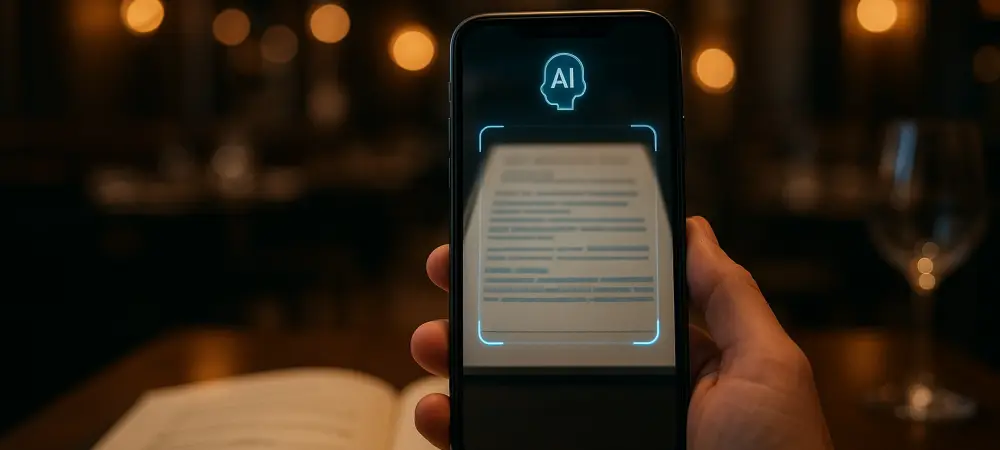
Guided vision provides voice feedback to help users identify objects or read fine print through Gemini Live. How does this system handle low-light environments like restaurants, and what are the most effective ways for a user to pan their camera to ensure the AI captures the necessary details?
The system is remarkably resilient in dim settings, leveraging the camera sensors of devices running Android 9 and later to illuminate and interpret menus or food labels. When using Guided Vision, the user should treat the phone like a steady scanner, moving in slow, deliberate arcs rather than quick jerks. Gemini Live provides real-time voice cues that act as a director, telling you to “reframe” or “center the object” when the lighting or angle isn’t quite right. This constant feedback loop ensures that even a blurry or poorly lit menu becomes accessible text. By listening closely to these verbal instructions, users can successfully navigate complex visual environments without needing a high-intensity flashlight.
Google Messages now allows for real-time collaboration on Keep grocery lists and notes within a chat. Beyond simple list-making, how can groups leverage this synchronized editing to manage complex tasks, and what is the process for adding these interactive elements during a live conversation?
This integration turns a standard text thread into a dynamic project management space where everyone can contribute simultaneously. To initiate this, a user simply needs to hit the “+” icon within Google Messages to pull in a Keep note that the entire group can then view and edit. This is particularly useful for planning events where multiple people need to check off tasks or add itinerary ideas in real-time without switching between different apps. Because the updates happen live, the friction of “who is doing what” is removed, making the conversation the central source of truth for the group. It effectively blends the spontaneity of messaging with the structured organization of a dedicated productivity tool.
Personalization in messaging now includes custom backgrounds and color-matched bubbles for individual chats. Why is this level of visual customization important for digital communication, and how does the system ensure that text remains legible when a user chooses to use a personal photo as a wallpaper?
Visual customization provides an immediate psychological cue that helps users distinguish between different social contexts, such as a formal work chat versus a casual family thread. The system utilizes an intelligent theme engine that scans the uploaded photo and automatically adjusts the bubble colors to ensure they complement the background while maintaining high contrast. This automated color-matching prevents the text from washing out, even if the chosen wallpaper is particularly bright or detailed. By creating these unique digital environments, users feel a stronger sense of personal connection to their conversations. It makes the interface feel less like a generic piece of software and more like a curated personal space.
What is your forecast for Android?
I believe we are entering an era where the operating system will become almost entirely invisible, functioning as a proactive layer that understands our physical environment as well as it understands our data. We will see the platform transition from a collection of apps to a unified intelligence that anticipates sensory needs, such as triggering Motion Assist before we even realize we are feeling unwell. The five new features released this month are just the beginning of a trend where the phone acts as a bridge between our digital and physical worlds. In the coming years, I expect the interface to move further away from touch and more toward ambient voice and visual feedback, making the “smartphone” a truly seamless extension of our natural senses.