

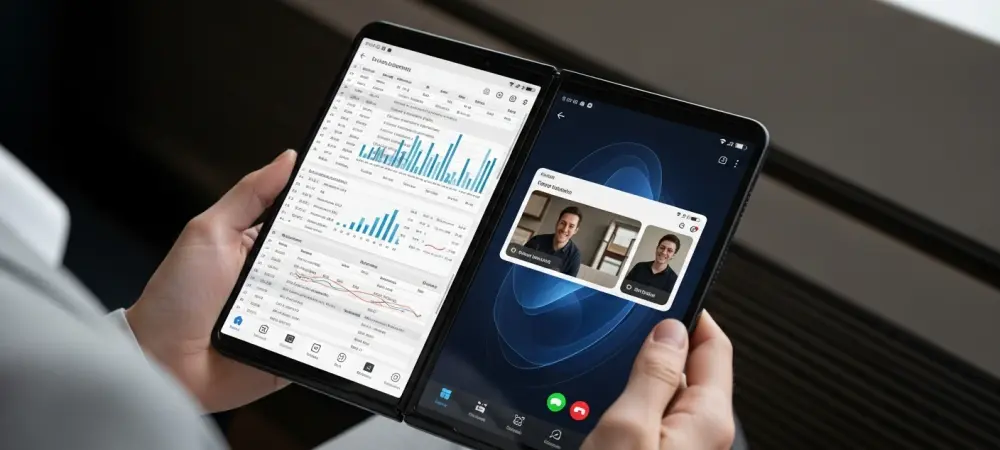
The arrival of Android 17 Beta 3 marks a pivotal moment where the mobile operating system finally sheds its smartphone-centric constraints to embrace a more robust, versatile computing architecture. This version achieves platform stability, meaning the application programming interface (API) surface is now finalized. For developers, this provides a predictable foundation for compatibility testing, ensuring that software will function perfectly upon the final launch. Unlike previous cycles that focused on code cleanup, this version prioritizes the user experience.
The Evolution of Android 17: From Refinement to Feature Parity
This milestone represents a transition from internal refinement to a feature-rich experience. While earlier versions focused on background optimization, Beta 3 prioritizes functionality that users can see and touch. It signals Google’s intent to elevate Android from a communication platform to a legitimate productivity environment capable of rivaling desktop systems. This shift is necessary to support the growing market of high-end hardware that demands more than simple mobile interfaces.
The transition allows the broader technological landscape to view Android as a viable workstation platform. By locking the API surface, Google enables a smoother transition for third-party developers, reducing the friction often associated with major OS updates. This stability is the bedrock upon which the new user-facing features are built, providing the reliability required for professional use.
Core Multitasking and Windowing Enhancements
The Expanded Bubbles Windowing System and Bubble Bar
The transformation of applications into floating windows via the Bubbles system is the centerpiece of this update. By dragging icons from the taskbar, users create a workspace that feels organic. This implementation is unique because it treats every application as a modular component of a larger workspace, rather than a full-screen silo. It allows for a level of fluid interaction that was previously limited to specialized desktop environments.
On tablets and foldables, the new “bubble bar” UI organizes these tasks, preventing clutter and ensuring that active processes remain accessible without blocking the primary view. This bar anchors active bubbles, offering a streamlined way to toggle between processes. It addresses the common criticism that mobile multitasking feels cramped by providing the organizational logic found in professional desktop shells.
Desktop Interactive Picture-in-Picture and External Display Support
Interactive Picture-in-Picture (PiP) enhances this desktop feel by allowing pinned layers to remain fully responsive. Unlike previous versions that only supported video, these layers now allow for real-time interaction, such as using a calculator while working in a primary app. The technical achievement lies in the system’s ability to maintain high touch-input accuracy on these small, floating layers without causing lag in background processes.
Improved scaling for external monitors ensures that widgets and text remain crisp across different pixel densities. The system now manages varying resolutions with greater precision, ensuring that UI elements maintain their visual integrity when moved between screens. This level of scaling logic differentiates Android 17 from competitors who often struggle with blurry assets or mismatched elements on secondary displays.
Shifts in the Mobile Productivity Landscape
The productivity landscape is shifting toward “desktop-class” functionality, seen in intuitive windowing controls and a redesigned screen-recording toolbar. These changes reflect an industry-wide move toward supporting complex tasks on diverse form factors. Users now expect mobile devices to handle professional workflows, moving away from the simplified interfaces of the past. This trend is forcing a redesign of traditional mobile paradigms toward a hybrid approach.
Furthermore, industry behavior is changing as developers optimize for these diverse form factors. The move toward intuitive controls reflects a realization that users no longer want to compromise on productivity while mobile. This evolution is driven by the demand for a single device that can transition seamlessly from a handheld phone to a full desktop setup.
Real-World Applications and Cross-Device Deployment
In professional settings, these advancements allow foldables to function as mobile workstations for creators and developers. Implementations in productivity suites show how the new windowing system handles multi-layered work, such as monitoring server logs while editing code. This deployment is effective in industries where referencing multiple data points simultaneously is essential for efficiency. It ensures the power of the hardware is finally matched by the software.
Content creators also benefit from the interactive PiP and external display support, allowing for more complex editing workflows. By enabling multiple instances of an app or persistent floating tools, Android 17 enables work that was previously restricted to laptops. This cross-device capability makes it easier for professionals to maintain productivity regardless of their physical location or the device they are using.
Technical Hurdles and Adoption Challenges
Technical hurdles remain, especially concerning the hardware demands of running multiple interactive layers. Managing a fragmented ecosystem of screen sizes requires scaling logic to prevent UI breakage and ensure performance consistency. Running several high-resource apps in windows requires significant memory management, which may lead to a disparate experience on lower-end devices within the Android ecosystem.
Additionally, the transition to desktop-style multitasking presents a learning curve that developers are refining through more intuitive gesture controls. Transitioning to this style of navigation requires a shift in user muscle memory. Google must refine the onboarding process to ensure these powerful features are utilized by the average user, making windowing gestures feel as natural as a simple swipe.
Future Outlook: The Convergence of Mobile and Desktop
The trajectory of Android points toward a unified OS for all computing form factors. Future developments will likely include deeper peripheral support and window management that adapts to user habits. This convergence could redefine the tablet market, positioning mobile hardware as a replacement for traditional laptops in many professional scenarios. As the software becomes more capable, the need for separate devices for work and play may diminish.
This evolution signifies a future where the device in your pocket is the only computer you truly need. Deeper integration of mouse and keyboard support, combined with advanced windowing logic, will bridge the final gap between mobile and desktop computing. The impact on the hardware market will be significant as high-end mobile devices begin to offer the same utility as standard PCs.
Final Assessment of Android 17 Beta 3
Android 17 Beta 3 successfully bridged the gap between mobile simplicity and desktop power by achieving platform stability and enhancing utility. The software provided a glimpse into a future where the primary device could be a smartphone or foldable without sacrificing professional capabilities. The leap in multitasking utility and the refinement of the windowing system provided a clear path for professional-grade mobile computing. This update proved that the mobile ecosystem was ready to move beyond basic consumption into the realm of serious production. As Google finalized the release, the impact on the industry suggested a permanent shift in how users perceive mobile hardware capabilities. The software ultimately transformed the mobile device into a versatile tool capable of meeting modern professional demands through a cohesive, multi-windowed experience.