

Real-world testing reveals that the Xerox C255a frequently falls short of its 25 pages per minute rating, particularly when processing complex color documents that require significant spooling time. This multi-function peripheral enters an increasingly competitive landscape where space efficiency and robust connectivity are no longer luxuries but fundamental requirements for hybrid work environments. While its design suggests a modern solution for professional scanning and printing, the hardware often hits unexpected bottlenecks that undermine its perceived value. Professionals seeking a seamless workflow might find the discrepancy between advertised speeds and actual throughput a point of frustration, especially when compared to rivals in the same price bracket. The device represents Xerox’s attempt to bridge the gap between enterprise-level reliability and home-office affordability, yet it remains a machine defined by its compromises as much as its capabilities in 2026.
Physical Attributes and Hardware Constraints
Visual Style and Desk Presence
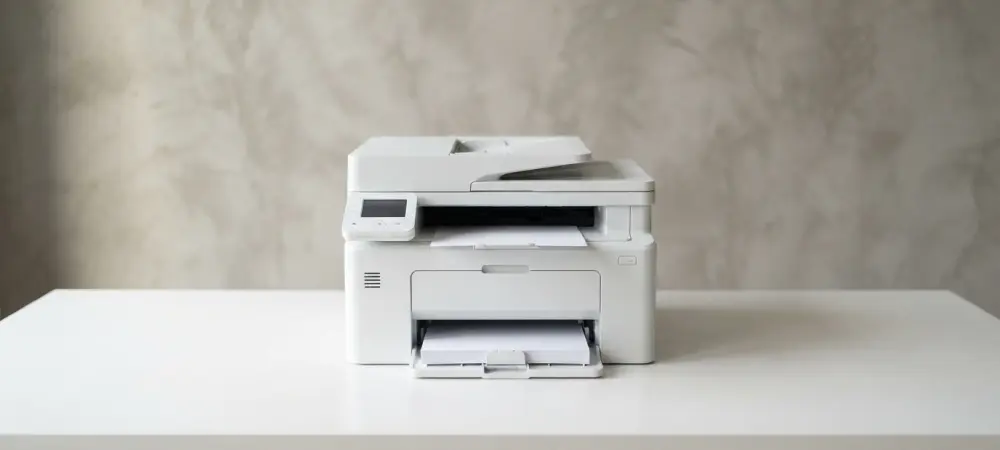
From a design perspective, the Xerox C255a represents a study in contrasts, sporting a contemporary white-and-black aesthetic that looks remarkably sharp when viewed directly from the front. This modern appearance allows it to blend seamlessly into various office environments, whether it sits on a sleek minimalist desk or a dedicated utility shelf. However, moving away from the front-facing view reveals a more utilitarian and slightly awkward visual profile where the black plastic components dominate the structure. Despite these subjective visual choices, the unit remains remarkably compact for a full-featured laser multifunction peripheral, making it an attractive option for users with limited desk space. It is surprisingly light for its class, allowing a single individual to reposition the machine without needing assistance or specialized equipment. This portability is a significant advantage for dynamic office layouts where equipment might be moved frequently.
The ergonomic considerations of the chassis also reflect a focus on space-saving, though they necessitate specific placement requirements that could limit flexibility in tighter quarters. An air vent is prominently located on the left side of the machine, meaning it requires several inches of clearance to prevent overheating during long print runs. Additionally, the automatic document feeder guides protrude slightly on the right, which prevents the unit from being placed flush against a wall or in a tight corner. These physical attributes suggest that while the device is small, it still demands a dedicated footprint with surrounding buffer zones to operate correctly. Users must plan their workspace accordingly, ensuring that power cables and network connections do not interfere with the ventilation or the mechanical movement of the paper guides. This balance of size and functionality remains a primary selling point, despite the minor spatial constraints that accompany the design.
Paper Handling and Spatial Compromises
Hardware design involves several compromises to maintain this compact form factor, most notably within the primary paper input systems. The main tray holds a maximum of 250 sheets, which is standard for entry-level machines but potentially insufficient for busy offices that consume large amounts of paper daily. Users who frequently print long documents may find it frustrating that the tray cannot accommodate a full 500-sheet ream, requiring more frequent refills and interruptions to the workflow. Furthermore, the inclusion of a single-sheet bypass feed instead of a multi-sheet multipurpose tray limits the device’s flexibility. Handling diverse media like envelopes, heavy cardstock, or letterheads becomes a manual, one-at-a-time process that can slow down specialized administrative tasks. For organizations that rely on high-volume document production, these constraints in paper capacity and media versatility could be a significant bottleneck.
The upper portion of the unit features a 50-sheet automatic document feeder designed to facilitate the digitization of multi-page documents with relative ease. However, a major mechanical limitation is that this feeder is strictly single-sided, or simplex, which stands in contrast to the printer’s ability to perform automatic duplex printing. While the device can output two-sided documents without manual intervention, the scanner cannot automatically capture both sides of an original page. Users dealing with double-sided records will find the process significantly more labor-intensive, as they must manually flip each sheet or use software workarounds to combine scans. This discrepancy between printing and scanning capabilities is a critical consideration for businesses that are transitioning toward paperless environments. The time lost to manual scanning can quickly offset any gains made by the machine’s compact size, particularly for offices that handle high volumes of forms.
Operational Performance and Resource Management
Software Integration and Enterprise Security
Initial setup of the Xerox C255a is generally straightforward, though it requires attention to detail regarding internal mechanical components like plastic locking clips that must be removed. The software side of the installation can prove more difficult, as the default installer sometimes omits necessary TWAIN scan drivers required by older legacy applications. Furthermore, the factory print driver configuration includes a fifteen-second delay between the command and the start of the job, which is intended to allow for job cancellation but often feels like a technical glitch. Despite these software hurdles, the device excels in data protection, supporting LDAP/Active Directory login and utilizing TLS 1.3 encryption. It also includes an OpenSSL module validated to FIPS 140-3 standards, providing a level of security typically reserved for enterprise machines. This makes it an outlier in the budget category, offering centralized management. The long-term financial viability of the device depends heavily on the cost of consumables, which can be high given the relatively low yield of the toner cartridges. The printer ships with starter toners that only provide a few hundred pages, forcing users to invest in replacement sets almost immediately after purchase. High-yield replacement options are available, but even these cap at 3,000 pages for black and 2,500 for color, necessitating frequent changes in a moderately busy setting. These low yields contribute to a cost-per-page that sits around 2.2 cents for mono and 11.5 cents for color, which is standard for laser technology but pales in comparison to ink-tank alternatives. For organizations prioritizing low upfront costs over low operational expenditure, this model remains viable, but high-volume users will likely find the recurring expenses burdensome. This financial trade-off defines the machine as a low-volume solution where security is prioritized over bulk efficiency.
Printing Efficiency and Output Integrity
Performance benchmarks indicated that while the engine was officially rated at 25 pages per minute, real-world monochrome output was significantly lower. Color documents proved even more challenging for the device, as the extensive spooling and image processing required for high-density graphics led to speeds that often dipped below 12 pages per minute. This performance bottleneck was particularly evident during duplex printing tasks, where the mechanical delay of flipping the page combined with digital processing time to create a slow experience for the user. In contrast, the scanning functionality remained a highlight, with the unit producing previews and high-resolution digital files with impressive speed and clarity. This disparity between the rapid digitization process and the slower printing output defined the machine’s functional rhythm, suggesting that it was designed more for a digital-first workflow than for production.
The quality of the printed output was generally professional for text-heavy documents, providing the crisp edges and deep blacks expected from a modern laser printer. However, color accuracy presented challenges, with a noticeable blue bias affecting the temperature of images and business graphics. This resulted in portraits having a slightly cool, desaturated appearance and marketing charts lacking the punch found in competing hardware. Furthermore, the absence of detailed color calibration tools within the standard print driver prevented users from manually correcting these aesthetic deviations. When coupled with the relatively high cost per page for toner, these factors emphasized the machine’s role as a utility-focused device rather than a creative one. For businesses that relied primarily on internal documents and basic correspondence, the output was acceptable, but those requiring precise color matching likely found the results to be somewhat uninspired.
Practical Considerations: The Final Assessment
The comprehensive evaluation of the Xerox C255a concluded that the device functioned as a niche solution for professional environments where security and a small physical footprint were prioritized over high-speed color output. While its administrative features and scanning capabilities performed remarkably well, the inconsistent print speeds and high cost of consumables limited its broader appeal. Prospective users were encouraged to evaluate their specific volume requirements before committing to the model, as high-frequency printing could lead to escalating operational expenses. Moving forward, businesses needing accurate color reproduction or heavy-duty paper handling likely sought more specialized equipment. However, for those requiring a secure, compact hub for digitizing documents and performing occasional print tasks, the C255a provided a stable, albeit sluggish, foundation that met the basic demands of the current hybrid work era.