

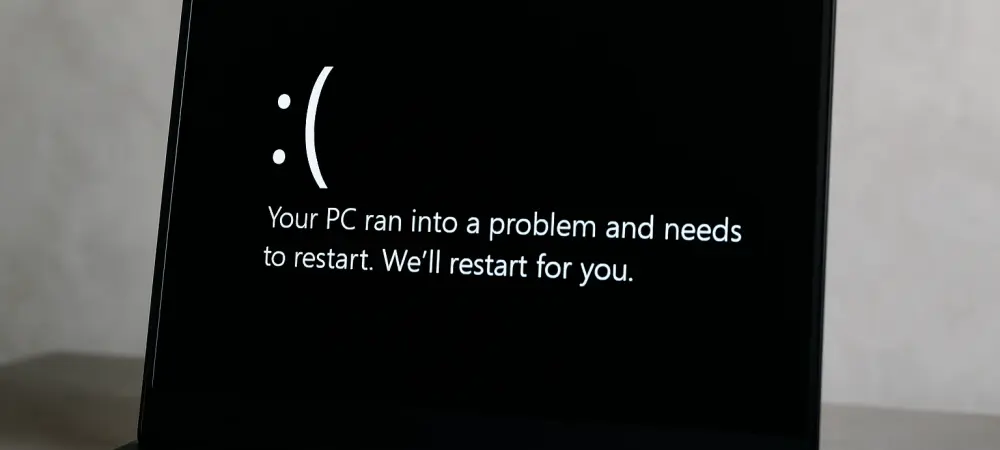
What happens when a decades-old symbol of tech frustration gets a modern makeover? Picture this: a critical system crash on a Windows device, but instead of the infamous blue error screen that has haunted users for generations, a sleek black interface emerges with clear, actionable details. This striking change, rolled out by Microsoft in the Release Preview Channel for Insiders, marks a pivotal moment in the evolution of Windows 11. It’s not just about aesthetics; it’s a signal of deeper transformations aimed at making system failures less intimidating and more manageable for millions of users worldwide.
This update transcends a mere visual tweak. It represents Microsoft’s broader mission to align Windows 11 with contemporary user expectations, prioritizing clarity, accessibility, and efficiency during critical errors. As technology becomes increasingly integral to daily life, the way operating systems handle and communicate failures can significantly impact user trust and productivity. This shift, coupled with innovative recovery tools and AI enhancements, underscores a strategic focus on modernization that could redefine how system errors are perceived and resolved.
A Visual Revolution in Error Handling
The transition from the Blue Screen of Death (BSOD) to the Black Screen of Death isn’t just a color swap; it’s a deliberate redesign for better usability. The new black background offers a cleaner layout, presenting error messages and technical details in a format that’s easier to read under stress. Microsoft has emphasized that this change aims to help users quickly grasp the issue—whether it stems from hardware, drivers, or software—and take steps toward recovery without the visual harshness of the old blue screen.
Beyond the immediate impact, this redesign reflects a growing trend in tech to soften the user experience during failures. Error screens are often the first point of interaction during a crisis, and a less jarring interface can reduce frustration. By adopting a darker, more modern aesthetic, Microsoft aligns with design principles seen in other platforms, signaling that even in moments of breakdown, the user experience remains a priority.
The End of an Era for BSOD
For over three decades, the Blue Screen of Death has been an iconic, if dreaded, hallmark of Windows system crashes. It became a cultural touchstone, often mocked in memes but feared in reality as a sign of lost work or hardware woes. However, as user interfaces evolved and expectations for intuitive design grew, the stark blue screen started to feel like a relic of a bygone era, out of step with today’s sleek, user-centric software environments.
Microsoft’s decision to overhaul this symbol wasn’t made lightly. Feedback from users over recent years, coupled with advancements in diagnostic tools, highlighted the need for an error interface that not only informs but also reassures. The shift to black represents more than a cosmetic update; it’s an acknowledgment that the emotional impact of tech failures matters just as much as the technical resolution, paving the way for a more empathetic approach to error handling.
Unpacking New Features Beyond the Screen
The Black Screen of Death is only part of a larger suite of updates in Windows 11. One standout addition is Quick Machine Recovery, integrated into the Windows Recovery Environment (WinRE). This tool automatically detects and resolves common issues without user intervention, slashing downtime—a feature that could save countless hours for professionals and casual users alike facing unexpected crashes.
Additionally, AI-driven enhancements are making waves, especially for Copilot+ PCs powered by Snapdragon, with support for AMD and Intel on the horizon. Features like natural language prompts in Settings allow users to adjust system preferences effortlessly, such as resizing a mouse pointer through simple voice or text commands. Meanwhile, productivity tools like “Draft with Copilot in Word” transform raw text into polished documents, showcasing how AI is streamlining everyday tasks within the Windows ecosystem.
For global accessibility, Microsoft has introduced tailored features like the Recall snapshot export for users in the European Economic Area, enabling seamless sharing with third-party apps. Text-based tools such as “Practice Reading in Coach” and “Read with Immersive Reader” further enhance inclusivity, offering customizable reading options and learning aids like speech highlighting. These updates collectively demonstrate a commitment to blending functionality with user empowerment across diverse needs.
Voices from the Tech Community
Reactions to the black screen overhaul and accompanying features have sparked lively debate among tech experts and Windows Insiders. A Microsoft spokesperson noted, “The updated interface is designed to minimize disruption, helping users understand and resolve issues swiftly.” This focus on clarity resonates with many who’ve long criticized the opacity of traditional error messages.
Early feedback from the Insider community paints a nuanced picture. Some users praise the modernized look, with one tester commenting, “It’s less alarming than the blue screen and feels like the system is guiding me to a fix.” Others, however, express curiosity about whether the visual change will be paired with even deeper diagnostic improvements in future updates. These varied perspectives highlight the balance Microsoft must strike between innovation and familiarity as it redefines error handling. Tech analysts also weigh in, pointing to data showing that user-friendly error interfaces can reduce support ticket volumes by up to 20% in enterprise settings. This statistic suggests that Microsoft’s redesign could have far-reaching implications, not just for individual users but for IT departments managing large-scale deployments. The conversation around this update continues to evolve, reflecting a shared interest in how design impacts recovery.
Adapting to the Modern Windows Experience
Navigating Windows 11’s latest changes doesn’t have to be daunting. Start by getting acquainted with the Black Screen of Death—take note of error codes and messages displayed, as they often point to specific culprits like driver conflicts or hardware glitches. Following the prompt to restart can prevent data loss, but documenting the issue can also aid in troubleshooting persistent problems.
Leveraging automated tools like Quick Machine Recovery is another key step. Trust the system to handle minor hiccups, but remain prepared to seek manual support for recurring errors by consulting Microsoft’s support resources or community forums. Exploring AI features, such as natural language settings adjustments on Copilot+ PCs, can also simplify routine customizations, while accessibility options like Immersive Reader cater to personalized learning or productivity needs. These practical approaches ensure users maximize the benefits of Microsoft’s updates, turning potential setbacks into manageable moments.
Reflecting on a Transformative Update
Looking back, Microsoft’s rollout of the Black Screen of Death and associated features in Windows 11 marked a significant departure from tradition, blending visual refinement with functional innovation. The integration of automated recovery tools and AI enhancements addressed long-standing pain points, while accessibility options broadened the platform’s appeal. This update stood as a testament to the power of listening to user feedback and adapting to modern design sensibilities.
Moving forward, users were encouraged to dive deeper into these tools, experimenting with AI capabilities and recovery features to enhance their workflows. Keeping an eye on future updates from Microsoft promised to reveal even more ways to streamline error resolution and system usability. This chapter in Windows history set a precedent for how technology could evolve to meet both technical and human needs with equal care.