

Industry reports from late 2026 show that while enterprise environments have largely abandoned SATA, the consumer market still utilizes the older interface for the cheapest available bytes. This divergence creates a landscape where a PCIe 5.0 storage device, such as the Samsung 9100 PRO, can offer a staggering 14,800 MB/s sequential read speed, while a legacy SATA drive remains fundamentally locked at a mere 550 MB/s. The 27-fold difference represents more than just a marketing number; it signifies a complete shift in how data moves between the processor and storage. As users navigate the late 2026 market, they must decide if the high-speed overhead of PCIe 5.0 is a necessary asset or an expensive luxury. This decision is further complicated by pricing volatility, as list prices often bear little resemblance to real-world street costs. Understanding the nuances of these interfaces is essential for anyone building a workstation, upgrading a gaming rig, or maintaining a home server, as the wrong choice can lead to significant bottlenecks or wasted expenditure on performance that the system cannot actually utilize. Moving beyond simple hardware, the shift toward NVMe also reflects changes in software optimization, where modern operating systems and applications are specifically architected to leverage the high parallelism and low latency of the NVM Express protocol, leaving the legacy AHCI standard used by SATA to handle bulk archival duties rather than high-performance operations.
1. Clarifying Terminology: SSD vs. NVMe
Confusion often arises when consumers compare “NVMe” to “SSD” as if they were two different things, but this comparison is technically inaccurate and can lead to costly purchasing mistakes. A solid-state drive (SSD) is a physical storage device that uses flash memory chips and a controller with no moving parts, effectively replacing old mechanical hard drives. NVMe (Non-Volatile Memory Express) is a communication protocol—a set of rules—specifically designed to allow high-speed storage to communicate over a computer’s PCI Express (PCIe) bus. SATA (Serial AT Attachment), on the other hand, is an older interface and protocol originally designed for the slow, spinning platters of mechanical drives. Consequently, every modern storage drive mentioned in these comparisons is an SSD, but they differ significantly in the language they speak and the physical pathway they use to transmit data to the rest of the system. Selecting the right drive requires a clear understanding that while all NVMe drives are SSDs, not all SSDs use the NVMe protocol, as many budget or legacy options still rely on the aging SATA III standard.
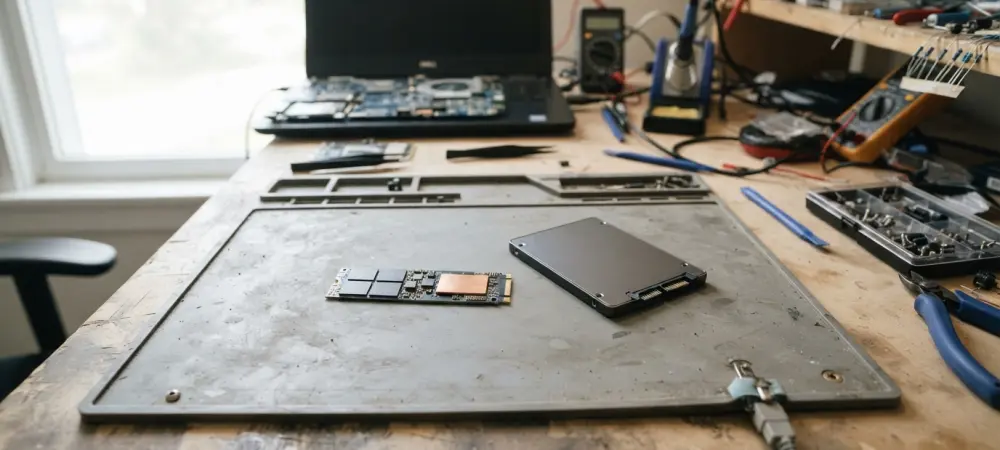
This distinction becomes even more critical when discussing the M.2 form factor, which many users mistakenly assume is synonymous with NVMe performance. The M.2 designation refers only to the physical shape and connector of the drive, resembling a small stick of gum that plugs directly into the motherboard. However, an M.2 slot can be wired for either SATA or NVMe—or sometimes both—depending on the motherboard’s design. This means a buyer could accidentally purchase an M.2 SATA SSD, which is physically similar to an NVMe drive but capped at the same 550 MB/s speed as a bulky 2.5-inch drive. Before finalizing a purchase, it is vital to verify the product specifications for keywords like “PCIe 5.0” or “NVMe 2.0” rather than relying solely on the physical appearance of the drive. Furthermore, hardware compatibility works in both directions; a modern PCIe 5.0 NVMe drive is physically compatible with a PCIe 4.0 slot but will see its performance cut in half to match the older slot’s bandwidth. Checking the motherboard manual is the only way to ensure that a high-speed investment is not immediately throttled by an outdated or improperly shared connection.
2. Interface Mechanics: Beyond Sequential Speeds
The headline speed ratings of 14,800 MB/s versus 550 MB/s capture only one aspect of the performance gap, as the underlying architecture of how these drives handle data is fundamentally different. SATA relies on the Advanced Host Controller Interface (AHCI), which was built for an era when data was retrieved by a physical arm moving over a spinning disk. This legacy protocol supports only a single command queue with a depth of 32 commands, meaning the drive can essentially perform only one task at a time. In contrast, the NVMe protocol was designed from the ground up for semiconductor-based storage, supporting up to 65,535 parallel command queues, each capable of holding 65,535 commands. In practical, day-to-day use, this massive parallelism translates to much faster response times when the system is under a heavy load. For instance, an NVMe drive can handle a background virus scan, a game update, and a high-definition video stream simultaneously without the stuttering or “hanging” often associated with SATA drives when their single queue becomes overwhelmed by multiple requests.
Beyond the logic of data queues, the physical and thermal characteristics of these interfaces play a significant role in system design and long-term stability. SATA SSDs, particularly the 2.5-inch variety, benefit from a larger surface area and lower power consumption, which allow them to run cool without any additional thermal management. Conversely, a top-tier PCIe 5.0 NVMe drive like the 9100 PRO pushes so much data that it generates significant heat, often necessitating a dedicated heatsink or even active cooling to prevent thermal throttling. When these drives overheat, the controller automatically reduces speeds to protect the components, which can drop a 14,800 MB/s drive down to speeds lower than those of a mid-range PCIe 4.0 model. Additionally, the move to NVMe allows for cleaner builds by removing the need for data and power cables, as the drives mount directly to the motherboard. This reduction in cabling is not just an aesthetic benefit; it improves airflow within the case and removes potential failure points like loose SATA cables or failing power connectors, making the system more robust for professional or enthusiast deployments.
3. Hardware Requirements: Motherboards and Slots
As the industry moves firmly into the late-2026 era, the storage speeds users experience are increasingly determined by platform architecture rather than the drive alone. Modern, latest-generation CPUs provide a specific number of PCIe lanes dedicated exclusively to storage, but the generation of these lanes varies significantly between budget and premium motherboards. To utilize the full 14,800 MB/s potential of a flagship Gen5 drive, the motherboard must feature an M.2 slot electrically wired for PCIe 5.0 x4. Many mainstream or older boards, including those based on hardware from just two years ago, may only offer PCIe 4.0 or 3.0 slots. While an NVMe drive will still function in these older slots due to the backward-compatible nature of the PCIe standard, the interface becomes a bottleneck. A PCIe 5.0 drive in a 4.0 slot will max out at roughly 7,500 MB/s, effectively wasting half of the drive’s performance. Users must carefully read their motherboard’s technical specifications to identify which M.2 slots connect directly to the CPU and which are routed through the chipset, as the latter often share bandwidth with other peripherals and may offer lower speeds.
Installation flexibility also depends on the physical space and power delivery provided by the system’s form factor. In desktops, the move toward PCIe 5.0 storage has forced motherboard manufacturers to include massive, integrated heatsinks that sometimes interfere with large CPU coolers or graphics cards. In the laptop market, the challenges are even more pronounced; thin-and-light ultrabooks rarely have the thermal headroom to support a 14,800 MB/s drive at full speed for sustained periods. Consequently, many high-end laptops still ship with PCIe 4.0 drives to balance performance with battery life and heat management. For users looking to upgrade an existing laptop, it is crucial to confirm whether the device uses a standard M.2 2280 size or a smaller variant like the M.2 2230, which is commonly found in handheld gaming consoles and compact tablets. This physical constraint, combined with the power limits of a mobile platform, often makes a mid-range PCIe 4.0 NVMe drive a more practical and cost-effective choice for portables than the current crop of power-hungry PCIe 5.0 flagships that dominate the desktop workstation market.
4. Performance Ceilings: Benchmarks vs. Reality
The staggering sequential read numbers advertised on product packaging often create unrealistic expectations for the average user, as these figures represent “best-case” scenarios that rarely occur during everyday computing. Sequential speed refers to the drive’s ability to read or write a single very large, continuous file, such as a 100GB 8K video project or a large database archive. While a 27-fold gap exists in these specific tasks, the majority of daily operations—such as booting an operating system, opening a web browser, or loading a word processor—rely on “random” access. Random performance measures the drive’s ability to find and read thousands of tiny, scattered files. In these random read and write scenarios, the gap between a high-end NVMe drive and a SATA SSD narrows considerably. Even though the NVMe drive is still faster due to its lower latency and improved protocol, the user experience might only feel “twice as fast,” rather than “twenty-seven times faster.” This reality check is vital for buyers who may be tempted to pay a premium for Gen5 speeds for a machine used primarily for office work or casual browsing.
Furthermore, sustained performance is a metric frequently overlooked in favor of peak burst speeds. Modern SSDs use a portion of their fast flash memory as a “cache” to handle incoming data quickly; however, once this cache fills up during an exceptionally large transfer, the drive must write directly to the slower main memory. For some budget-oriented NVMe drives, this can result in write speeds dropping significantly after just a few minutes of heavy use. High-end models like the Samsung 9100 PRO mitigate this with larger caches and more sophisticated controllers, allowing them to maintain high speeds for much longer durations. Professional reviewers often use tools like CrystalDiskMark or fio to test these sustained limits, revealing that a drive rated for 14,000 MB/s might only sustain 4,000 MB/s once the SLC cache is exhausted. For the typical consumer, this means that while the drive is incredibly fast for quick bursts of activity, its true value is only realized in professional environments where massive amounts of data are moved consistently, making the choice between SATA and NVMe as much about the “duration” of work as it is about the “speed” of the task.
5. Workload Analysis: Professional and Creative Needs
For creative professionals and data scientists, the transition to high-speed NVMe is no longer optional but a fundamental requirement for modern workflows. In 2026, working with high-bitrate video formats or massive RAW photo libraries requires throughput that completely saturates the SATA interface. A video editor working with multiple streams of uncompressed 8K footage will find that a SATA SSD causes dropped frames and stuttering during timeline scrubbing, as the interface cannot deliver data fast enough to the GPU and CPU. By upgrading to a PCIe 5.0 drive, these professionals can move hundreds of gigabytes of footage in seconds rather than minutes, drastically reducing downtime and increasing productivity. Similarly, those working with local AI datasets or large-scale software compilation benefit from the high IOPS (Input/Output Operations Per Second) that only the NVMe protocol can provide. When a compiler has to access thousands of small header files, the low latency of a Gen5 drive can shave significant time off every build cycle, which accumulates into hours of saved labor over the course of a project.
On the other hand, the gaming community occupies a middle ground where the benefits of ultra-high-speed storage are real but offer diminishing returns. Technologies like DirectStorage have enabled games to decompress assets directly on the GPU, bypassing CPU bottlenecks and significantly reducing load times. While this technology thrives on high NVMe bandwidth, current evidence suggests that a fast PCIe 4.0 drive provides nearly the same gaming experience as a cutting-edge PCIe 5.0 model. The millisecond differences in level loading are often imperceptible to players, making the 14,800 MB/s speed of a 9100 PRO overkill for a dedicated gaming rig. For gamers, the priority should remain on capacity and reliability; a 4TB PCIe 4.0 drive often offers better value than a 2TB PCIe 5.0 drive at the same price point. The extra capacity allows for a larger library of modern titles, which frequently exceed 150GB each, while the PCIe 4.0 interface still provides more than enough speed to satisfy the requirements of any current or upcoming game engine released through the end of this decade.
6. Market Economics: The Cost per Terabyte
As of November 2026, the economic landscape for flash storage remains complex, with pricing influenced by both technological shifts and global supply chain conditions. Historically, SATA SSDs were significantly cheaper than their NVMe counterparts, but that gap has narrowed to the point of vanishing at certain capacities. Price trackers currently show that for 1TB and 2TB drives, the difference between a mid-range SATA SSD and a mainstream PCIe 4.0 NVMe drive is often less than ten dollars. This makes the SATA interface a poor value for new builds, as the massive performance increase of NVMe comes at a negligible cost premium. However, the situation changes at the high end of the spectrum. For users looking for 8TB or 16TB of bulk storage, SATA remains the more accessible option; high-capacity NVMe drives require more complex controllers and better thermal management, which keeps their prices elevated. In these bulk storage scenarios, the goal is often “cost per gigabyte” rather than “speed per second,” allowing SATA to maintain its foothold as a secondary storage solution for media archives and backups.
The premium tier of the market, currently occupied by PCIe 5.0 drives, operates under a different set of economic rules. While the list price for a flagship 2TB Gen5 drive like the Samsung 9100 PRO is $679.99, aggressive sales and competition have driven these prices down toward the $400 mark during promotional windows. This high volatility means that a savvy buyer can sometimes snag a top-tier drive for nearly the same price as a high-end Gen4 model. Despite these occasional deals, the overall market has seen elevated prices recently due to a disciplined approach by NAND manufacturers to avoid oversupply. A typical 2TB NVMe drive that might have cost $150 a year ago is now often priced closer to $280, making every purchase a significant investment. For those on a budget, the most cost-effective strategy in late 2026 is to look for “previous-generation” PCIe 4.0 drives, which offer 7,000 MB/s speeds at a fraction of the cost of the latest Gen5 models, providing a price-to-performance ratio that is currently unbeatable for the average consumer.
7. Global Supply Trends: NAND and Manufacturing
The pricing and availability of both NVMe and SATA drives are inextricably linked to the health of the global NAND flash market, which has undergone significant consolidation and strategic shifts. Major players like Kioxia and Samsung have pivoted their production lines to prioritize high-density, high-layer-count chips used in enterprise AI servers and data centers. This focus on the high end of the market has a trickle-down effect on consumer availability; when data center demand is high, the supply of flash for retail SSDs tightens, keeping prices elevated for both legacy SATA and new NVMe models. Recent reports indicate that Kioxia’s supply is effectively sold out through 2027, suggesting that the current price floor is unlikely to drop significantly in the near future. These supply-side constraints mean that manufacturers are less likely to engage in price wars for consumer drives, as they can sell every chip they produce to high-margin industrial and enterprise clients building out massive AI infrastructure.
Technological advancements in NAND manufacturing are also driving the divergence between these tiers. The move toward 232-layer and even 300-layer 3D NAND allows for much higher capacities in the same physical footprint, which is essential for the 8TB and 30.72TB drives entering the market. However, these high-density chips often rely on Quad-Level Cell (QLC) technology, which can be slower and less durable than the Triple-Level Cell (TLC) flash found in premium drives. Manufacturers are increasingly using QLC for both SATA and budget NVMe drives to keep costs down, while reserving high-performance TLC for flagship PCIe 5.0 models. This creates a “quality gap” that savvy buyers must navigate. A high-end 2TB NVMe drive with TLC flash will not only be faster than a QLC-based SATA drive but will also last significantly longer in terms of total bytes written. For users who perform heavy write operations, such as constant video recording or large-scale data processing, the higher upfront cost of a TLC-based NVMe drive is often justified by its superior endurance and consistent performance over its multi-year lifespan.
8. Deployment Examples: Recent Hardware Releases
The current hardware landscape provides several clear examples of how these technologies are being deployed across different market segments. At the high end, the Samsung 9100 PRO has set a new benchmark for consumer storage, offering not only 14,800 MB/s speeds but also a wide range of capacities up to 8TB. This drive represents the “North Star” of the NVMe market, showing what is possible when power and thermal constraints are secondary to raw throughput. Meanwhile, other manufacturers are filling the gaps with more specialized products. Goodram recently introduced its Master series, a PCIe 5.0 contender reaching 14,000 MB/s, proving that the high-speed tier is becoming more competitive as smaller brands gain access to advanced Gen5 controllers. These flagship drives are increasingly being paired with heavy, actively cooled heatsinks that include tiny fans—a clear indication that the physical limits of M.2 thermal management are being pushed to their absolute breaking point in the quest for higher sequential numbers.
In the mainstream and mobile sectors, focus has shifted toward efficiency and compact form factors. The WD Blue SN5100 serves as a prime example of the “refined” PCIe 4.0 tier, offering speeds of 7,100 MB/s—a 30% improvement over the previous generation—while remaining cool enough for thin laptops without a bulky heatsink. This drive targets the largest segment of the market: those who want modern speeds without the complications of Gen5 cooling requirements.