

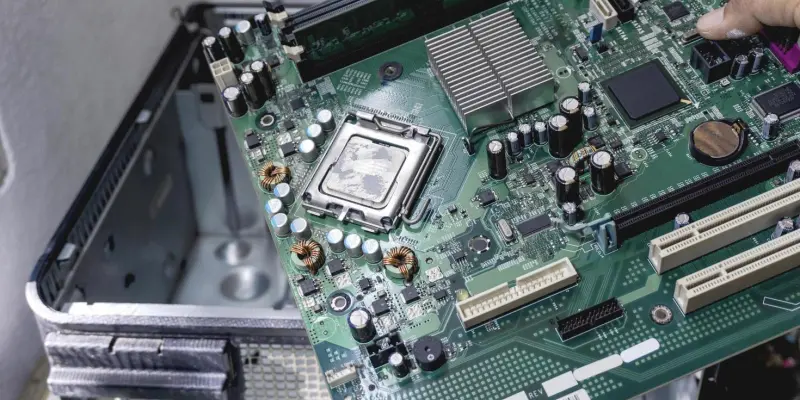
Building and maintaining a PC can be a highly rewarding experience, especially when customized to exact specifications. Despite this, even seasoned PC builders sometimes miss out on valuable motherboard features that could enhance their experience significantly. Over time, it becomes evident that some advanced yet often overlooked features are more than worth the investment. Here, we’ll explore five such features that should be considered for integration into the next build to streamline and improve the PC building and troubleshooting process.
The Value of Diagnostic Tools
Diagnosing PC issues often proves to be a complex and time-consuming endeavor. Debug displays and LEDs have emerged as pivotal tools in simplifying this process. Initially, these features might seem unnecessary, but they hold immense value when it comes to quick issue identification and resolution. These diagnostic tools can swiftly pinpoint problems like BIOS misconfigurations and overheating, which otherwise would require hours of troubleshooting. In a scenario where full-time work responsibilities make PC maintenance feel burdensome, the efficiency and ease provided by these diagnostic tools become indispensable. The debug displays and LEDs effectively reduce the time spent on resolving common issues, making them a worthwhile consideration for any PC build. Their inclusion in motherboard designs underscores the importance of minimizing troubleshooting time, thereby allowing builders to focus on maximizing system performance.
Simplifying BIOS Updates
Modern motherboard features have significantly simplified the once daunting process of updating BIOS. One such feature, BIOS flashback, allows BIOS updates without the need for components like CPU, RAM, or GPU. This innovation ensures that even in the absence of crucial system components, the BIOS can be efficiently updated, resolving compatibility issues more swiftly and effectively.
Despite being available for several years, many builders have only recently started utilizing this feature. BIOS flashback represents a much simpler and quicker method for maintaining the most current BIOS updates with minimal hassle. This reduction in complexity serves as a crucial advantage, particularly for those aiming to keep their systems running smoothly and efficiently. Embracing BIOS flashback can lead to a more streamlined process, enhancing overall system reliability and performance.
Improved System Control
Dedicated buttons for control functions on motherboards can vastly improve user experience, particularly during maintenance or system troubleshooting. Forcefully shutting down a frozen system used to be a common occurrence, often necessitating the use of the PSU button when the case power button was unresponsive. This method, however, is far from ideal and can lead to further complications. Integrating dedicated power and reset buttons into motherboard designs adds an extra layer of convenience and practicality. These buttons simplify system control, especially when case functionalities are unresponsive. Their low cost and high utility make them a valuable addition to any motherboard. The inclusion of these dedicated buttons ensures efficient system management, reducing the need for forceful shutdowns and enhancing the overall user experience.
The Shift to Onboard Wi-Fi
The debate between Ethernet and Wi-Fi has long been a topic of discussion among PC builders. While Ethernet is often perceived as more stable and faster, onboard Wi-Fi deserves a closer look due to the convenience and cost savings it offers. As builders relocate and face challenges in setting up Ethernet connections, onboard Wi-Fi becomes an attractive alternative. In practical terms, onboard Wi-Fi has shown comparable performance in speed and reliability to traditional Ethernet connections. This shift can lead to significant cost savings, eliminating the need for additional Ethernet setup components. The convenience offered by onboard Wi-Fi, particularly in new or transient setups, highlights its potential as a reliable and efficient alternative. Embracing onboard Wi-Fi can streamline the PC building process, providing both practical utility and economic benefits.
Maximizing Storage Performance
Transitioning to modern storage solutions can have a profound impact on a system’s overall performance. While M.2 slots have been common in motherboard designs, many builders have continued to rely on SATA SSDs. The advent of NVMe drives, however, offers significantly improved speeds over older SSD technologies, presenting a compelling case for their adoption.
The performance gains from NVMe drives justify their modest price difference, making them a worthwhile investment for long-term benefits. These drives provide enhanced speeds and efficiency, leading to noticeable improvements in system performance. By integrating NVMe storage solutions, builders can maximize their system’s potential, ensuring faster data access and overall improved functionality. The transition to NVMe drives represents a strategic upgrade, enhancing both the performance and lifespan of the system.
Embracing Modern Motherboard Features
Cost efficiency is crucial in PC building, but advanced motherboard features can provide substantial long-term benefits. Balancing initial costs with the long-term advantages these features offer is essential for optimizing the PC building and maintenance experience. Diagnostic tools, simplified BIOS updates, and onboard Wi-Fi, among others, address common issues faced by builders, making the entire process more efficient. These modern features consistently demonstrate their ability to reduce complexity and improve system performance, underscoring the importance of not overlooking them. Embracing advancements in motherboard technology can lead to fewer headaches and a more enjoyable build process. By considering these features, builders can ensure a smoother, more efficient, and more reliable PC building experience.
Making the Smart Choice
Building and maintaining a PC can be incredibly satisfying, especially when you customize it to meet your exact needs. However, even experienced PC builders sometimes overlook valuable motherboard features that can greatly enhance their overall experience. Over time, it’s clear that some advanced, yet often ignored, features are definitely worth the extra investment. Here, we will explore five such features that can significantly streamline and improve both the PC building and troubleshooting process. Firstly, integrated diagnostics tools can save you countless hours by identifying hardware issues quickly. High-quality power phases and improved cooling solutions improve performance and longevity. Built-in Wi-Fi and Bluetooth can save space and reduce the need for external adapters. Advanced BIOS options allow for more precise and easier overclocking settings. Lastly, multiple M.2 slots for SSDs can improve storage capabilities, making for faster load times and better overall system performance. Considering these five overlooked features for your next build can lead to a smoother and more efficient PC-building experience. Each one offers unique advantages, making the additional cost a wise investment. So, before you finalize your next build, take a moment to evaluate what these features could do for your setup. They may provide benefits that far outweigh the initial expense, offering you a much more rewarding and efficient computing journey.