

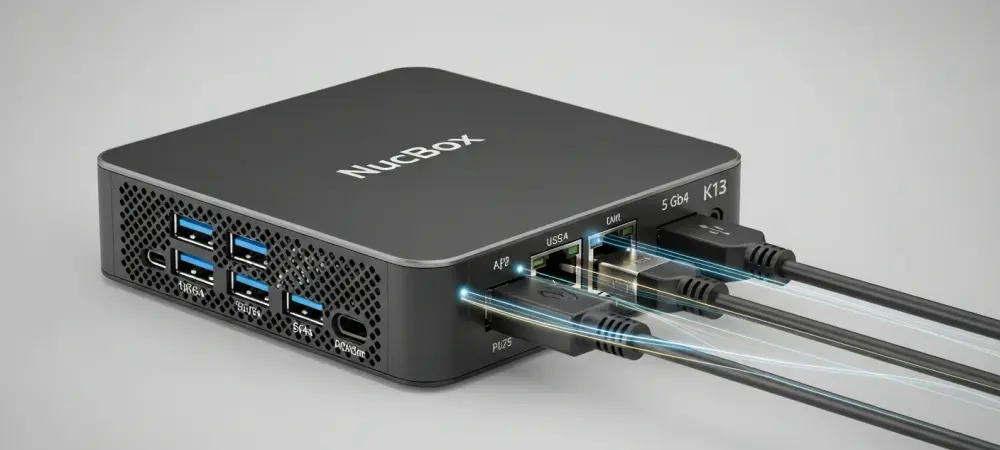
I’m joined today by Dominic Jainy, an IT professional whose work at the intersection of artificial intelligence and high-performance computing gives him a unique perspective on the latest hardware trends. We’re here to break down GMKtec’s new NucBox K13, a mini PC that’s making waves with its Intel Lunar Lake processor. We’ll explore how its impressive AI capabilities translate to real-world use, discuss the significance of its high-speed networking, and evaluate its potential as both a compact workstation and a gaming machine, all while considering its place in a crowded market.
The NucBox K13 features the Intel Core Ultra 7 256V, delivering up to 115 AI TOPS. Can you detail some specific local AI inference or automation workflows this enables for professionals, and what kind of real-world performance metrics can they expect?
That 115 TOPS figure is really the headline here. It signifies a massive leap in on-device processing power, moving AI tasks from the cloud directly onto your desk. For a professional, this means running complex language models for coding assistance or content generation right on the machine, without latency or privacy concerns. Think of a data analyst running automated scripts to process datasets locally, or a creative professional using AI-powered tools for image upscaling or video editing in near real-time. This level of performance enables a much more fluid and secure workflow, where the AI is an immediate, responsive tool rather than a service you’re waiting on.
This is GMKtec’s first mini PC to include a 5 GbE LAN port. What specific use cases or professional environments demand this level of network speed, and how does it combine with the dual USB4 ports to create a uniquely powerful and versatile workstation?
The inclusion of a 5 GbE port is a clear signal that this machine is built for more than just casual use. This kind of network speed is crucial in environments where large files are constantly being moved across a local network. For instance, a small video production team could use this to pull massive 4K video files from a central network-attached storage (NAS) system without bottlenecks. When you pair that high-speed LAN with dual USB4 ports, you create an incredibly versatile data hub. You could have one USB4 port driving multiple 4K displays and the other connected to a high-speed external SSD, all while pulling data at 5 Gbps from the network. It turns this compact box into a central nervous system for a very demanding professional setup.
With its integrated Arc 140V GPU, the K13 is positioned as a capable gaming device. Could you provide some examples of modern games that run well on this system, including the typical frame rates and graphical settings a user could anticipate?
The integrated Arc 140V GPU is a game-changer for a device this small. While you won’t be running the latest AAA titles at 4K ultra settings, it’s more than capable of delivering a fantastic gaming experience. We’re talking about playing popular esports titles and a wide range of modern indie games at 1080p with very respectable and smooth frame rates. The emphasis here is on “decent frame rates” for most games, which suggests you can enjoy a fluid, playable experience without needing a bulky, power-hungry dedicated graphics card. It’s perfect for someone who wants a powerful work machine that can also serve as a solid entertainment hub for an evening of gaming.
The K13’s design is ultra-compact, weighing just 523 grams. How did your team address thermal management to ensure sustained performance during heavy workloads, and what was the thinking behind including a convenient physical BIOS Reset Button on the I/O?
Packing this much power into a chassis that weighs just over 500 grams presents a significant thermal challenge. The key is an advanced cooling solution designed to efficiently dissipate heat from the Core Ultra 7 processor during sustained tasks, whether it’s AI processing or gaming. The goal is to prevent thermal throttling and ensure the user gets consistent performance. As for the BIOS Reset Button, that’s a wonderfully practical feature for power users and tinkerers. If you’re experimenting with overclocking or custom settings and something goes wrong, you don’t have to open the case. You can simply press the button to restore factory settings, which saves an incredible amount of time and frustration. It shows a real understanding of the enthusiast audience.
Starting at $669, the NucBox K13 enters a competitive market. How does its combination of LPDDR5X memory, up to 16 TB of potential storage, and Lunar Lake processing power justify its value proposition against other high-performance mini PCs available today?
The value proposition for the K13 is built on a very balanced and forward-looking set of features. You’re not just buying a processor; you’re investing in a complete, high-performance platform. The fast 8533 MT/s LPDDR5X memory ensures the Lunar Lake CPU is never starved for data, which is critical for both productivity and gaming. The ability to expand storage up to a massive 16 TB with dual PCIe 4.0 SSDs is almost unheard of in this form factor, offering incredible flexibility. For a starting price of $669, you’re getting a next-generation AI-capable processor, cutting-edge memory, and future-proof connectivity and storage options that many competitors simply can’t match at that price point.
What is your forecast for the mini PC market?
I believe the mini PC market is on the cusp of a major transformation, moving from a niche category to a mainstream computing solution. The performance we’re seeing from processors like Intel’s Lunar Lake, with powerful integrated graphics and dedicated AI engines, is eliminating the traditional trade-off between size and capability. We will see these devices become the primary computer for a growing number of professionals and home users who value a clean, minimalist workspace but are unwilling to compromise on power. The future is compact, efficient, and incredibly intelligent.