

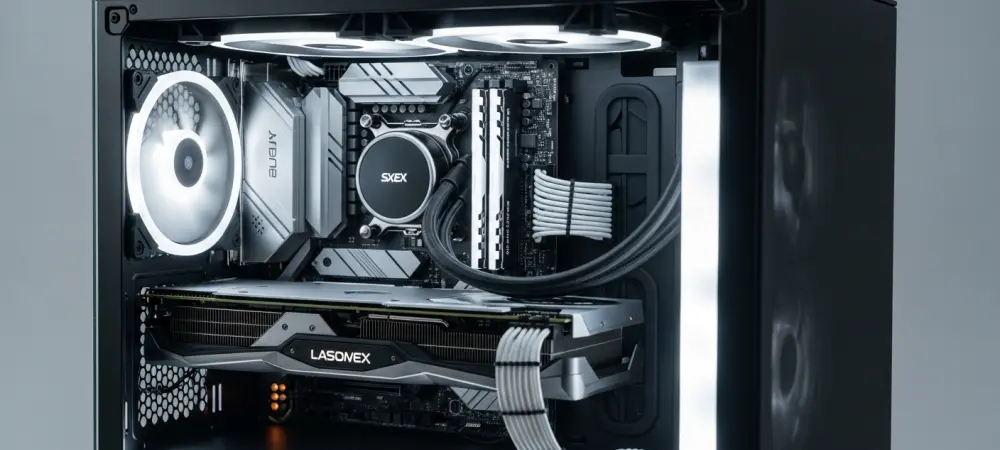
The traditional landscape of custom personal computer assembly is undergoing a profound metamorphosis as enthusiasts prioritize aesthetic elegance and thermal efficiency alongside raw processing power. For decades, the internal architecture of computers remained largely stagnant, defined by a standard layout that forced every power cable, data ribbon, and fan wire to occupy the same visual space as the core components themselves. However, The emergence of the back-connect motherboard signifies a radical departure from these long-standing design constraints by relocating connectors to the underside of the PCB. This engineering pivot addresses the most persistent challenge in the PC-building community: the management of unsightly wires that disrupt airflow and clutter the view through modern panoramic glass panels. By hiding the infrastructure of the machine, builders can finally achieve a professional-grade look without the tedious labor of complex cable routing that once defined high-end projects. This shift marks a transition where the motherboard serves as a clean canvas rather than a cluttered junction. The industry moved toward a design where mechanical utility no longer compromises visual integrity or cooling potential.
The Historical Perspective: Traditional Component Layouts
Architecture Evolution: The Limitations of Front-Side Port Design
The foundational principles of the ATX motherboard standard were established during an era when computer cases were predominantly opaque, beige enclosures designed for utility rather than display. During this period, the primary engineering objective was to minimize the distance between power delivery components and the central processing unit to ensure electrical stability and reduce interference. Consequently, all power headers, SATA ports, and front-panel connectors were positioned on the front side of the motherboard for immediate accessibility during the assembly process. This layout was highly efficient for mass manufacturing and basic office environments where internal aesthetics were entirely irrelevant to the end user. However, as the DIY market shifted toward high-performance gaming and content creation, this legacy design began to clash with the desire for visible, high-end hardware. The presence of thick, rigid cables protruding directly from the center of the board became an inherent design flaw for those seeking a modern look.
As transparent acrylic and tempered glass side panels became standard features in modern chassis, the visual shortcomings of traditional front-side port layouts were magnified to an unavoidable degree. Builders found themselves spending an inordinate amount of time utilizing zip ties and Velcro straps to tame the chaotic sprawl of cables that naturally obscured expensive graphics cards and intricate liquid cooling loops. Even with high-quality sleeved cables, the physical presence of the 24-pin motherboard connector and the various PCIe power leads remained a visual distraction that interrupted the sleek, industrial lines of the internal components. This aesthetic friction created a demand for a new architectural standard that could maintain electrical performance while completely removing the wiring from the primary viewing chamber. The industry eventually realized that the only way to achieve a truly wireless appearance was to fundamentally rethink where the motherboard connects to the rest of the system. This realization paved the way for the current generation of back-connect solutions that prioritize the visual experience.
Design Challenges: The Complexity of Modern RGB and Cooling Systems
The rapid proliferation of Addressable RGB lighting and sophisticated multi-fan cooling configurations has exponentially increased the volume of cabling required to operate a high-end personal computer. In the current hardware ecosystem, it is not uncommon for a single cooling fan to require two separate wires—one for power and one for lighting—which often leads to a staggering number of individual connections for a standard nine-fan setup. When combined with the necessary cables for liquid cooling pumps, thermal sensors, and dedicated hardware controllers, the front side of the motherboard quickly becomes a dense thicket of wires. This complexity often forces builders to compromise on their initial design visions, as the sheer bulk of the wiring can interfere with the placement of other components or block the very lighting effects that the builder intended to showcase. Managing this “cable tax” has become one of the most time-consuming and frustrating aspects of modern PC building, requiring a level of precision and patience that often exceeds the technical difficulty of the assembly itself.
Beyond the purely visual frustrations, the concentration of cables on the front and back of the motherboard creates significant mechanical and thermal challenges for builders. When all cables must be routed through small grommets to reach front-side headers, the resulting density of wiring behind the motherboard tray often makes it difficult to secure the rear side panel without excessive force. This “rat’s nest” of cables can put undue stress on delicate connectors and limit the space available for additional storage drives or specialized controllers located in the rear chamber. Furthermore, the physical mass of these cables can impede the natural convection of heat within the chassis, as stagnant air pockets form around the tangled clusters of plastic and copper. In extreme cases, poorly managed cabling can even interfere with fan blades or obstruct the intake of cool air, leading to higher operating temperatures and reduced component longevity. The industry recognized that simplifying this connectivity was essential not only for aesthetics but also for maintaining the structural and thermal integrity of modern systems.
The Modern Paradigm: Reimagining Hardware Aesthetics and Airflow
Structural Innovation: Achieving a Minimalist Internal Look
The introduction of back-connect motherboard designs, such as the ASUS BTF and Gigabyte Project Stealth series, represents a total re-engineering of the standard PCB layout. By relocating the 24-pin power, EPS, SATA, and fan headers to the underside of the motherboard, these boards allow all cabling to be handled entirely behind the motherboard tray. This design choice ensures that the front of the board remains completely unobstructed, revealing the intricate soldering and high-grade capacitors that are often hidden by a shroud of cables. More importantly, this architecture often includes a specialized high-power slot designed to deliver electricity directly to the graphics card without the need for external PCIe power cables. This integration eliminates the most prominent and often bulkiest wires in the entire system, creating an appearance that is closer to a piece of professional industrial equipment than a standard consumer PC. This structural shift requires a coordinated effort between motherboard manufacturers and case designers to ensure that chassis cutouts align perfectly with the rear-facing ports. Achieving a minimalist internal look through back-connect technology does more than just enhance the visual appeal; it fundamentally simplifies the assembly process for both novice and expert builders. When the cables no longer need to be painstakingly threaded through grommets and tucked into tight corners, the time required to build a system is significantly reduced. This streamlined approach allows builders to focus more on the selection of high-performance components and the fine-tuning of software settings rather than the manual labor of cable management. Additionally, the lack of wires on the front of the motherboard facilitates easier maintenance and upgrades, as components like RAM modules and M.2 SSDs are no longer buried under a layer of power leads. The result is a system that looks consistently clean regardless of how many peripherals are attached or how many times the internal configuration is modified. This level of organization was previously only achievable by the most dedicated professional modders who spent dozens of hours creating bespoke internal mounting solutions for every single component.
Forward-Looking Strategies: Practical Steps for Modern Enthusiasts
The successful integration of back-connect components required builders to adapt their approach to hardware selection and spatial planning within the case. While the visual benefits were immediate, the mechanical requirements necessitated a deeper understanding of how modern components interact with the motherboard’s underside. Builders had to prioritize cases that provided at least thirty millimeters of clearance behind the motherboard tray to accommodate the bulk of the power connectors and their associated cables. This preparation was crucial for ensuring that the rear panel could be closed without compressing the wires, which could lead to connector fatigue or thermal issues in the wiring chamber. Furthermore, the selection of power supplies shifted toward models with more flexible, high-gauge wiring that could handle tight turns without sacrificing electrical conductivity. This focus on the “hidden” side of the build became just as important as the presentation of the front side, ensuring that the finished product was as robust as it was attractive.
Builders who successfully transitioned to this new standard reported a significant decrease in assembly time and a substantial improvement in overall system organization. To achieve similar results, enthusiasts should begin by cross-referencing their preferred motherboard model with a list of certified compatible chassis to avoid mounting conflicts. It was found that using modular power supplies allowed for the removal of unnecessary cables, further simplifying the space management behind the tray. Additionally, checking for the presence of specialized GPU power slots on the motherboard helped eliminate the need for standard PCIe cables, creating a truly wireless look. This evolution in building practices provided a roadmap for creating computers that are both high-performing and visually stunning. By following these established steps, enthusiasts ensured their systems remained at the forefront of design and efficiency. These insights proved that the shift toward back-connect architecture was a permanent and beneficial change for the custom computer community.