

The steady evolution of an operating system often unfolds not in grand, sweeping revolutions but in a series of deliberate, thoughtful enhancements that accumulate over time to create a more refined and capable user experience. This principle is clearly visible in the latest update for the Windows 11 Release Preview Channel, a build that moves beyond simple bug fixes to deliver a host of meaningful new features. The release, identified as KB5077241, showcases Microsoft’s strategy of continuous innovation, blending headline-grabbing conveniences with critical, under-the-hood upgrades that strengthen the platform’s core.
This update serves as a compelling example of how a seemingly routine release can significantly impact daily workflows and system management. It represents a carefully balanced package designed to appeal to a broad spectrum of users. From the immediate gratification of a built-in network diagnostic tool and an updated set of digital expressions to the robust, enterprise-grade improvements aimed at simplifying IT administration, this preview offers a clear window into the future direction of Windows 11. The journey through these changes reveals a platform that is actively listening to its users while simultaneously fortifying its foundation for professional environments.
Unpacking the Latest Insider Update More Than Just Minor Tweaks
Microsoft’s approach to Windows 11 development is one of consistent, iterative progress, and the KB5077241 update for the Release Preview Channel is a prime embodiment of this philosophy. Rather than waiting for major biannual releases, the company is injecting valuable new functionalities directly into the ecosystem, ensuring the operating system remains dynamic and responsive to user needs. This update, which elevates Windows 11 to builds 26100.7918 and 26200.7918, demonstrates a commitment to enhancing the user experience on multiple fronts simultaneously.
The significance of this release extends beyond a simple list of patched vulnerabilities or minor adjustments. It is framed as a meaningful upgrade that weaves convenience into the fabric of the user interface while also delivering substantial system-level improvements. This dual focus ensures that both casual users and IT professionals find tangible benefits. What follows is an exploration of this update’s key components, from the immediately accessible speed test and new emoji to the more profound, enterprise-focused enhancements that signal the platform’s ongoing maturation and its dedication to modern computing environments.
A Closer Look at the Newest Features and System Refinements
Diagnosing Your Connection Directly from the Taskbar
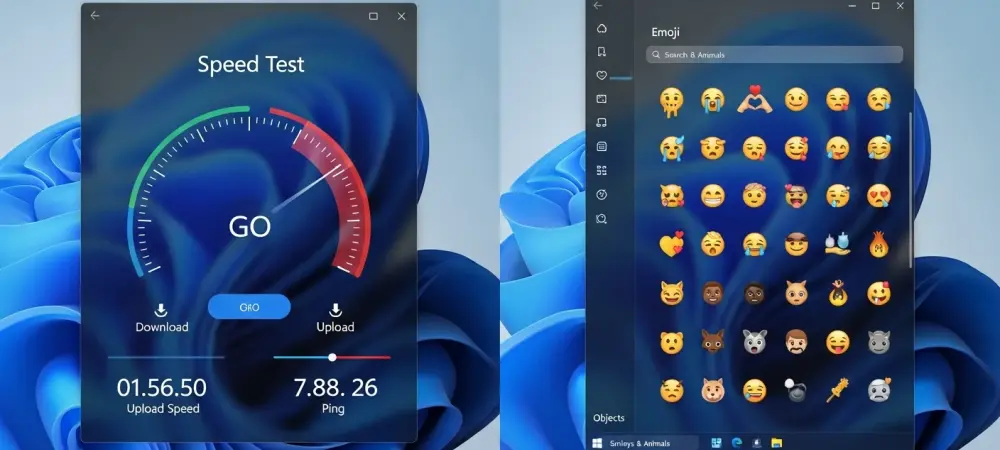
A new native network speed test has been introduced, designed to streamline performance diagnostics for Ethernet, Wi-Fi, and Cellular connections without leaving the desktop environment. This tool is seamlessly integrated into the Quick Settings panel, accessible with a simple click on the network icon in the system tray. This one-click solution stands in stark contrast to the previous workflow, which required users to navigate to third-party websites or install separate applications to measure their connection’s performance.
While the built-in tool offers unparalleled accessibility for the average user looking for a quick bandwidth check, it may not satisfy the needs of network administrators or power users. Specialized services often provide more granular data, including latency jitter, packet loss, and detailed server information. The value of the Windows tool lies in its convenience and its ability to provide a reliable baseline for troubleshooting common connectivity issues, effectively balancing ease of use with essential functionality.
Express Yourself Anew Windows 11 Embraces Emoji 16.0
In a move that aligns Windows 11 with the latest trends in digital communication, the operating system now incorporates the full Emoji 16.0 standard. This update introduces a thoughtfully curated set of new characters across all major categories, ensuring users have access to a modern and relevant palette for self-expression. The new emoji are immediately available in the emoji panel, accessible via the Windows key + period shortcut.
The real-world impact of having a current emoji set is felt across a wide range of applications, from personal messaging on social media platforms to professional collaboration within tools like Microsoft Teams. This seemingly minor addition is a reflection of a broader commitment to providing a polished and contemporary user experience. By maintaining parity with other operating systems and platforms, Microsoft ensures that communication remains consistent and nuanced, preventing the misinterpretations that can arise from outdated or missing emoji characters.
Fortifying the Foundation for Professional Environments
This update delivers significant enhancements for organizational use, challenging the perception that it is purely a consumer-focused release. The Backup & Restore experience has been expanded for organizations, now restoring user settings and Microsoft Store apps automatically upon first sign-in on Microsoft Entra hybrid joined devices. Furthermore, Quick Machine Recovery (QMR) is now enabled by default for non-domain-joined Windows Professional devices, providing them with the same streamlined recovery features previously available only to Home users.
Further bolstering its enterprise credentials, the update introduces Microsoft Entra ID group and role security identifier (SID) resolution. This capability allows the system to translate cloud-based security identifiers into readable names, enabling the direct use of Entra-only groups in file permissions and access control lists without relying on a hybrid Active Directory infrastructure. These features collectively empower IT administrators by simplifying identity management, streamlining device lifecycle processes, and improving the overall resilience of managed environments.
Polishing the Experience with Widespread Quality-of-Life Upgrades
Beyond the headline features, the update contains a diverse collection of refinements that collectively improve usability and system performance. Advanced users and security professionals will welcome the native integration of Sysmon functionality, which allows for sophisticated system event monitoring to aid in threat detection. Meanwhile, everyday usability is enhanced by improved taskbar logic for uncombined app windows, preventing entire groups of windows from collapsing into the overflow area prematurely.
The update also brings a host of smaller but impactful changes. Users can now set .webp image files as their desktop background directly from File Explorer, and new controls for camera pan and tilt have been added to the Settings app for supported devices. These detailed improvements, which also include performance gains in storage scanning, login screen reliability, and resume-from-sleep time, demonstrate a broad-based approach to refinement. It is this comprehensive attention to detail, addressing everything from system security to minor visual inconsistencies, that defines the true value of the update.
Turning Previews into Practical Advantages
The most impactful takeaways from this preview are clear: a new tier of built-in convenience arrives with the network speed test, communication becomes more expressive with updated emoji, and a robust new set of tools is now available for IT professionals. These features are not just abstract improvements but practical tools that can be leveraged immediately by those in the Windows Insider program. For the general user base, they offer a concrete preview of the enhancements to anticipate in upcoming public releases of Windows 11.
For those with access to the preview, the guidance is to actively engage with these new capabilities. Test the network speed tool under various conditions to gauge its accuracy. Explore the new emoji set in different applications to see how it integrates into daily communication. For system administrators, this is an opportunity to pilot the new Entra ID resolution and QMR features in a controlled environment. By actively testing these additions, users can not only provide valuable feedback but also prepare to take full advantage of them once they become widely available.
The Future of Windows Is in the Details
This latest preview for Windows 11 showcased a clear dual focus on delivering both user-facing novelties and deep, foundational enhancements to the operating system. It was a release that did not force a choice between a more enjoyable user experience and a more secure, manageable platform; instead, it delivered both in a single, cohesive package. The inclusion of features like the speed test and new emoji ran parallel to enterprise-grade improvements in identity management and system recovery.
The long-term importance of this iterative update model proved to be crucial in keeping the Windows 11 ecosystem dynamic and competitive. By consistently rolling out new features and refinements, Microsoft maintained momentum and demonstrated a commitment to responding to the evolving needs of its diverse user base. Ultimately, this update reinforced a key strategic insight: the strength of a modern operating system is built not just on its marquee features, but on a relentless and detail-oriented commitment to improving the everyday experience for everyone.