

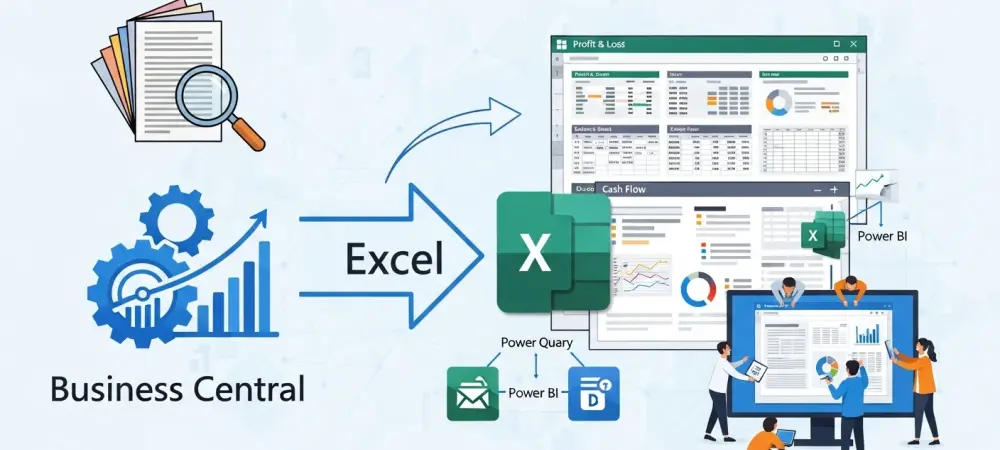
Finance leaders today are discovering that the rigid architecture of an enterprise resource planning system often acts more as a cage for their data than a springboard for strategic insight. While Microsoft Dynamics 365 Business Central serves as a formidable engine for transaction processing, many organizations are intentionally migrating their primary reporting workflows toward Microsoft Excel. This transition represents a fundamental shift in how professionals view their data, moving away from static system views and toward a more flexible, finance-led environment. Understanding this evolution is critical for any organization seeking to modernize its decision-making processes and ensure that its financial operations keep pace with the speed of global markets.
This strategic realignment occurs because native ERP environments, while secure and robust, often lack the agility required for the nuanced analysis that modern business demands. By establishing a specialized reporting layer in Excel, finance departments can bridge the gap between raw data collection and actionable intelligence. This guide explores the limitations of standard reporting, the strategic advantages of an Excel-based infrastructure, and the specific methods through which teams can reclaim ownership of their financial narratives.
Why Prioritizing an Excel-First Reporting Strategy Is Essential
The decision to move beyond native system constraints is often driven by the realization that an initial ERP setup is merely a snapshot in time. During implementation, dimensions and charts of accounts are defined based on the business needs of that specific moment. However, as organizations evolve through 2026 and beyond, those rigid structures often become obstacles. Shifting the reporting focus to Excel allows finance teams to bypass these historical limitations, providing the freedom to reorganize and reinterpret data without the need for high-stakes, permanent system reconfigurations.
Moreover, this approach yields significant financial benefits by curbing the reliance on external technical consultants for report modifications. When the reporting logic resides within Excel, internal staff can make adjustments in minutes rather than waiting weeks for a partner to scope and deliver a custom solution. This reduction in the time-to-insight is invaluable during high-pressure periods such as board meetings or audit cycles, where the ability to answer a question immediately can alter the course of a strategic discussion.
Operational efficiency and data security also see marked improvements when Excel is used as a sophisticated reporting layer. By automating the flow of data, teams eliminate the manual manipulation that often leads to “spreadsheet bloat” and human error. Instead of spending hours copying and pasting figures, professionals can focus on high-level analysis, ensuring that the information provided to stakeholders is both accurate and timely. This method maintains the ERP as the immutable system of record while turning Excel into a dynamic system of intelligence.
Best Practices for Implementing a Finance-Led Excel Reporting Layer
Successfully transitioning to this model requires a departure from traditional, disjointed workflows in favor of a cohesive integration strategy. The process begins with finance teams taking an active role in defining how data should be presented, rather than leaving those decisions to IT departments. By creating a standardized framework, organizations can ensure that their Excel-based reports are not just isolated workbooks, but a scalable extension of the Business Central environment.
A well-executed implementation focuses on maintaining the integrity of the system of record while providing the finance department with the tools to innovate. This involves establishing clear protocols for data access and template management, ensuring that every stakeholder is looking at the same figures even as they manipulate the presentation. The goal is to build a roadmap that empowers the finance team to manage their own data structures, creating a more responsive and self-sufficient internal culture.
Establish a Live Data Connection to Maintain a Single Version of Truth
The cornerstone of a modern reporting strategy is the move toward live reporting, which replaces the archaic practice of manual CSV exports. Manual exports are inherently flawed because the data is outdated the moment it leaves the ERP, necessitating a constant cycle of re-exporting and reconciling. By establishing a direct, automated link to Business Central, finance teams ensure that their spreadsheets remain synchronized with the general ledger in real-time, providing a “live heartbeat” for all financial analysis.
Technical implementation of these connections involves utilizing specialized integration tools that allow Excel to “speak” directly to the Business Central database. This ensures that when a transaction is posted in the ERP, the corresponding report in Excel reflects the change instantly. This connectivity eliminates the risk of using stale data and provides a foundation of trust for every calculation performed within the spreadsheet environment.
Case Study: Eliminating Reconciliation Errors in Multi-Entity Consolidations
In one notable scenario, a mid-sized organization struggled with the complexity of managing five separate legal entities, each with its own localized requirements. The month-end close was a grueling process that relied on manual data pulls and a high degree of manual reconciliation, often leading to discrepancies that were only discovered days later. By implementing a live data connection, the firm was able to automate the consolidation process entirely within a single Excel workbook.
This shift allowed the finance team to pull real-time balances from all five entities simultaneously, applying currency conversions and eliminations automatically. The result was a reduction of the month-end close by three full days. More importantly, the live link ensured that any late-arriving entries were immediately reflected across all consolidated statements, removing the need for repeated manual checks and providing the leadership team with an accurate view of the total corporate health much sooner than previously possible.
Design the Reporting Layer for Operational Agility and Scalability
Building flexible report templates is essential for accommodating the inevitable changes in a company’s structure, such as an evolving chart of accounts or new dimension requirements. A best practice is to separate the data layer—where the raw information resides—from the presentation layer, where the actual formatting and charts are displayed. This separation allows finance professionals to update the logic or structure of a report without breaking the underlying data connections, ensuring that the reporting infrastructure remains resilient as the business grows.
When templates are designed with scalability in mind, they can handle an increasing volume of data and more complex reporting requirements without a loss in performance. This agility is particularly crucial during stakeholder meetings, where leadership might request a sudden change in perspective, such as viewing expenses by department instead of by region. A well-constructed reporting layer allows for these rapid adjustments on the fly, demonstrating a level of responsiveness that traditional ERP reports simply cannot match.
Real-World Example: Adapting to Radical Business Pivots Without ERP Reconfiguration
A manufacturing company recently faced a significant challenge when it launched a new product line that required a completely different tracking methodology than its existing operations. The foundational dimensions within their Business Central setup were not designed to capture the specific nuances of this new venture, and a full system overhaul was deemed too costly and disruptive. Instead, the company utilized its Excel reporting layer to bridge the gap. By creating custom grouping logic within Excel, the finance team was able to map existing transaction data to the new product line’s requirements. This allowed them to track performance and profitability for the new venture in real-time without changing a single setting in the ERP. The business was able to pivot its strategy and monitor the success of the new initiative with total clarity, proving that a flexible reporting layer can serve as a vital tool for organizational growth and adaptation.
Empower the Finance Team Through Self-Service Reporting Tools
Reducing the dependency on IT departments and external partners is a primary goal for modern finance leaders who prioritize speed and autonomy. When finance teams have the skills and tools to build their own custom reports, the internal culture shifts from being reactive to being proactive. Training staff on advanced Excel functions and specialized integration add-ins allows the department to respond to internal inquiries without the bottleneck of a formal help-desk ticket or a consultant’s billable hours.
This self-service model fosters a deeper understanding of the data among the finance staff, as they are the ones who design the logic and maintain the connections. It encourages an environment where professionals are constantly looking for ways to improve the quality of insights they provide. By moving reporting in-house, organizations not only save money but also build a more resilient and knowledgeable team that is better equipped to support the company’s strategic goals.
Case Study: Reducing External Consulting Spend by Moving Reporting In-House
A large retail organization found that its annual spend on external partner fees for “simple” report modifications had spiraled into the tens of thousands of dollars. Every time a new KPI was needed or a tax regulation changed, a consultant had to be brought in to adjust the system’s output. Seeking a more sustainable path, the company invested in empowering its internal finance team to manage these requirements through an Excel-led reporting framework. The transition allowed the internal team to take full control of their reporting destiny, building and maintaining complex KPI dashboards that updated automatically. Within the first year, the organization eliminated nearly all its external consulting costs related to financial reporting. The finance team became much more responsive to the needs of the regional managers, providing tailored reports that drove better inventory management and higher profit margins across their various locations.
Final Evaluation: Embracing Excel as a Permanent Reporting Infrastructure
The movement of financial reporting from native Business Central environments toward a sophisticated Excel layer represented a fundamental maturation of the finance function. It was clearly demonstrated that the most effective reporting was managed by those who understood the specific nuances of the business, rather than by technical gatekeepers. By viewing Excel as a sophisticated system of intelligence rather than a simple spreadsheet, organizations unlocked a level of agility that was previously unattainable.
Strategic value was found in the ability to bridge the gap between rigid data structures and the fluid needs of leadership. For high-growth companies and those with complex, multi-entity structures, this approach provided a sustainable path forward that prioritized accuracy and speed. Moving toward this model proved to be the most reliable way to ensure that financial insights remained as dynamic as the businesses they described. Ultimately, the successful organizations were those that chose to integrate their tools seamlessly, allowing the finance team to spend less time on the mechanics of data and more on strategic refinement.