

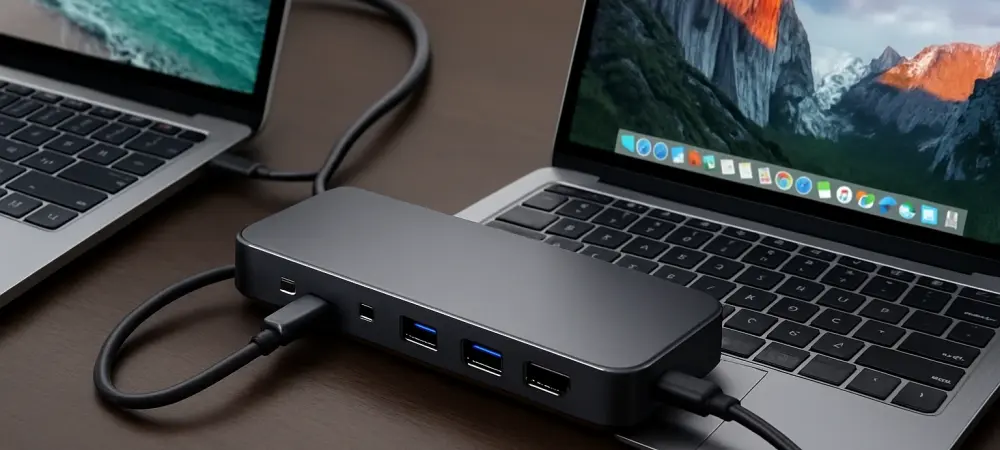
Introduction to the iDock B10 Review
Imagine juggling two powerful systems—a high-end gaming rig and a professional workstation—while struggling with a tangle of cables and multiple peripherals cluttering the desk, a scenario all too common for professionals and gamers who rely on dual-computer setups to manage their demanding workflows. The purpose of this review is to evaluate whether a specific docking solution can address these challenges and prove itself as a worthwhile investment for such users.
In today’s hybrid work and gaming environments, the need for seamless integration and high-performance docking stations has never been more critical. These tools must not only simplify connectivity but also deliver uncompromised speed and visual clarity. With this in mind, the assessment focuses on whether this cutting-edge KVM docking station can meet lofty user expectations and justify its price tag.
The stage is set to explore how this device performs under real-world conditions, catering to both technical precision and user convenience. This evaluation aims to uncover if it truly stands out as a game-changer for those managing complex setups.
Overview of the iDock B10 Features and Design
This docking station boasts an impressive array of specifications tailored for high-end users. It supports dual 8K monitors at 60Hz or high refresh rates up to 240Hz, ensuring stunning visual output for tasks requiring pinpoint accuracy. This capability positions it as a top-tier choice for anyone pushing the boundaries of display technology.
Beyond video performance, the device offers 11 versatile ports, including USB 3.0, HDMI, DisplayPort, Gigabit Ethernet, an SD card slot, and a 3.5mm headphone jack. It also provides 100W power delivery, capable of charging high-performance laptops during extended sessions. Such a comprehensive port selection minimizes the need for additional hubs or adapters, streamlining connectivity.
A standout feature is the integrated KVM functionality, allowing control of two systems with a single keyboard, mouse, and monitor setup. Switching between systems is effortless, achieved via a front panel button or a wired remote, enhancing user efficiency. Marketed as an all-in-one solution, it reduces desk clutter by replacing multiple devices, with robust connectivity and exceptional visual clarity as key selling points.
Performance Evaluation of the iDock B10
When put to the test, the docking station’s real-world performance shines in several critical areas. Video output quality remains consistently sharp, with dual 8K monitor support delivering crisp visuals for intricate design work or immersive gaming. Switching speed between systems is notably quick, ensuring minimal disruption during multitasking.
The device proves effective for demanding tasks across various fields, such as graphic design, software development, and high-frame-rate gaming. High refresh rates up to 240Hz cater to users needing fluid motion on screen, while the dual 8K resolution handles pixel-heavy projects with ease. This makes it a reliable companion for performance-driven environments.
Additionally, USB expansion, Ethernet connectivity, and power delivery hold up well during prolonged use, supporting hybrid work scenarios without faltering. However, occasional minor signal interruptions were noted during testing, though these were infrequent and did not significantly hinder overall functionality. These small hiccups aside, the docking station maintains a high standard of peripheral responsiveness.
Pros and Cons of the iDock B10
Among the strengths of this device, the exceptional visual performance with dual 8K support stands out as a major advantage for users requiring top-tier display capabilities. The extensive range of port options accommodates a variety of peripherals, reducing the need for additional hardware. Furthermore, the user-friendly switching mechanism for dual-computer setups enhances workflow efficiency.
This docking station is particularly well-suited for performance-driven individuals, such as professionals and gamers who prioritize cutting-edge specifications. Its ability to handle complex tasks with minimal lag or compatibility issues makes it a valuable tool for those with intensive workloads. The design clearly caters to a specific, tech-savvy audience.
On the downside, the price point of $224.99, even with a 10% launch discount, may deter budget-conscious buyers. Additionally, the dual 8K resolution could be considered overkill for many who are content with 4K displays. Given these factors, its advanced features may limit its appeal to a niche market rather than mainstream users seeking simpler solutions.
Final Assessment and Recommendation
Balancing the innovative features against practical limitations, this docking station emerges as a powerful tool for a specific user base. Its standout capabilities in video output and system integration are tempered by a cost that may not align with every budget. The performance, while impressive, must be weighed against individual needs and financial considerations. For those in need of high-end dual setups, the device proves its worth through robust connectivity and seamless operation. However, it may not be the ideal choice for everyone, especially when compared to alternatives like the iDock M10, a 4K version tailored for MacBook users, which offers a more accessible entry point within AV Access’s product lineup. This comparison highlights the brand’s flexibility in addressing varied requirements.
The verdict hinges on the target audience’s priorities. If top-tier specs and workflow optimization are paramount, the investment appears justified. For others, exploring more affordable options within the same brand might yield a better fit for less demanding setups.
Who Should Consider the iDock B10?
This device is ideally suited for graphic designers, software developers, and gaming enthusiasts who require high-end dual-computer configurations. Its advanced features cater specifically to those pushing the limits of visual and processing demands. For such users, the docking station represents a significant upgrade in workspace efficiency.
Before making a purchase, potential buyers should carefully evaluate budget constraints and display resolution needs. Assessing workspace requirements is also essential to ensure the device integrates well into existing setups. These considerations will help determine if the investment aligns with practical expectations.
Ultimately, the value lies in its performance and connectivity for those who prioritize cutting-edge technology. For users with less intensive needs, more budget-friendly models like the C10 or C20 from AV Access might suffice. This docking station remains a premium choice for a select group ready to embrace its full potential.
Looking back, the evaluation of this docking station revealed a blend of groundbreaking strengths and niche limitations. For those who invested in it, the next step involved optimizing their workspace to fully leverage its capabilities, such as pairing it with compatible high-resolution displays. Exploring complementary accessories or software to enhance system switching further refined the user experience.