

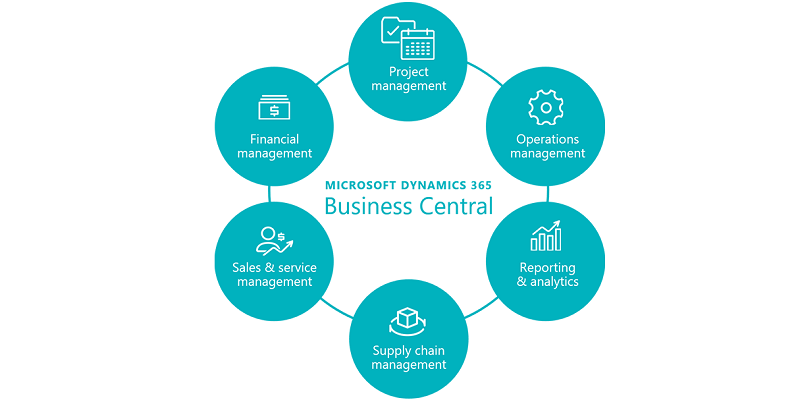
In the ever-evolving world of technology, it is crucial for Microsoft Dynamics GP and Business Central partners to recognize the signs that indicate an earlier migration is necessary to avoid potential disruptions. As businesses grow and their needs change, it becomes essential to transition to a more scalable and innovative platform. This article will explore the signs, benefits, and risks associated with migrating from Dynamics GP to Business Central, along with the advantages of integrating Tangicloud Fundamentals for nonprofit organizations.
Significant signs of growth and expansion
If your clients’ businesses are experiencing significant growth or expansion, it is important to evaluate whether Dynamics GP can handle the increased data volume and transaction complexity over the next 1-5 years. Despite being a reliable solution, Dynamics GP may struggle to keep up with the demands of a rapidly growing organization. This can result in decreased efficiency, increased processing time, and potential bottlenecks in financial management.
Benefits of migrating to Business Central
Migrating to Business Central provides a more scalable solution with flexible licensing options to accommodate your clients’ evolving needs. As their businesses grow, they can seamlessly scale their operations within the cloud-based environment of Business Central. This not only ensures smoother operations but also reduces the risk of outgrowing the system in the future. Additionally, Business Central offers simplified upgrade processes, enabling your clients to stay up-to-date with the latest features and functionality.
Seamless Remote Accessibility with Business Central
One of the key advantages of Business Central is its cloud-based nature, which offers seamless remote accessibility. In today’s fast-paced and interconnected world, users need the flexibility to access and work with the system from anywhere, at any time. Whether they are traveling or working remotely, Business Central enables users to remain productive and connected without any limitations. This remote accessibility feature enhances collaboration, productivity, and overall efficiency within the organization.
Simplified Integration Capabilities of Business Central
Business Central simplifies integration with its native capabilities, connectors, APIs, and Power Platform, allowing for effortless connections with other Microsoft and third-party applications. This creates a unified and connected ecosystem for seamless workflows. Your clients can integrate their financial management system with customer relationship management (CRM) tools, productivity software, e-commerce platforms, and more. Such integration capabilities enable data exchange and streamline processes, reducing manual efforts and potential errors.
Enhanced features of Business Central and Tangicloud Fundamentals
With Dynamics 365 Business Central and Tangicloud Fundamentals, your clients can leverage advanced features tailored to their specific needs. The embedded Power BI provides powerful data visualization and analysis capabilities, allowing organizations to gain deeper insights to make informed decisions. Additionally, the AI-powered CoPilot feature offers intelligent suggestions, anomaly detection, and predictive analytics. This assists in enhancing decision-making, identifying trends, and improving operational efficiency.
Potential risks of not migrating from Dynamics GP
As GP’s mainstream support tails off, you risk facing the absence of critical security updates, bug fixes, and access to new features. This may leave your system vulnerable and hinder its long-term sustainability. By not migrating to Business Central, your clients’ businesses may suffer from stagnant technology and miss out on the latest advancements that can drive growth and competitive advantage.
Tangicloud Fundamentals: A Tailored Solution for Nonprofit Accounting
By offering your clients Tangicloud’s Fundamentals, a nonprofit accounting software industry solution that seamlessly integrates with Business Central, you can provide significant benefits tailored specifically to their financial and reporting needs. Fundamentals improves financial management through features such as accounts payable and receivable, general ledger, and fixed assets. It simplifies budgeting and enhances reporting capabilities, allowing nonprofits to effectively track and manage their finances. Furthermore, it offers better grant and donation tracking, enabling organizations to streamline their fundraising efforts and allocate resources more effectively toward their missions. Fundamentals also promotes collaboration among team members through shared workspaces and document management capabilities.
Successes of Tangicloud’s nonprofit customers on Business Central
Share with your clients the success stories of Tangicloud’s nonprofit customers who have migrated to Business Central. Highlight the fact that 100% of their nonprofit customers renewed their subscriptions last year, and over a thousand users continue to enjoy the benefits of the Business Central platform. This demonstrates not only the positive feedback from existing users but also the satisfaction and continued trust in the platform’s capabilities.
In conclusion, recognizing the signs that indicate an earlier migration from Dynamics GP to Business Central is crucial for partners. By offering your clients a more scalable and innovative solution, they can avoid potential disruptions and stay ahead of their evolving needs. With Tangicloud Fundamentals seamlessly integrating with Business Central, your clients can benefit from enhanced financial management, simplified budgeting, improved reporting capabilities, streamlined collaboration, and the ability to focus on their missions. Embrace the power of Business Central and Tangicloud Fundamentals, and help your clients unlock their true potential.