

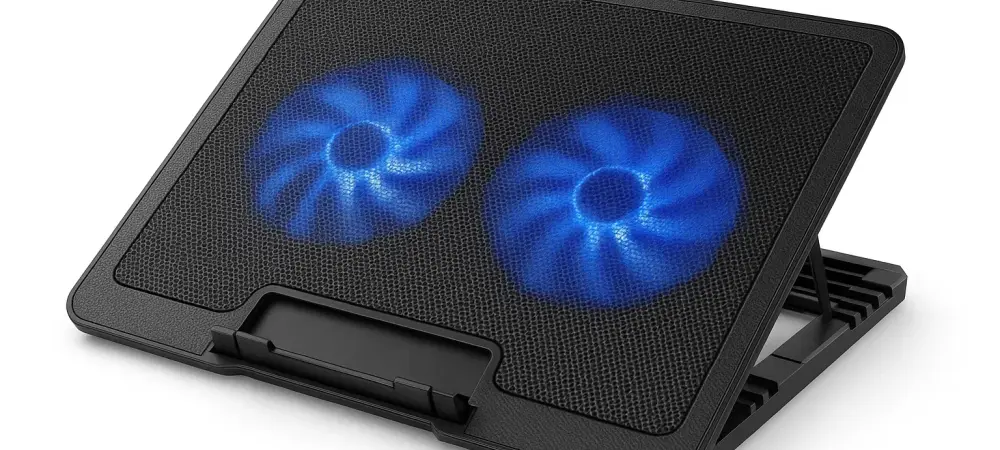
In an era where powerful gaming laptops and high-performance productivity machines dominate the market, efficient thermal management becomes crucial for the sustained performance and longevity of these devices. Overheating can not only lead to throttled performance but also result in hardware damage over time. Enter the Llano V10 Gaming Laptop Cooling Pad, an engineered solution aimed at mitigating these concerns by delivering exceptional cooling prowess. However, while the V10 excels in controlling temperatures, it has its fair share of drawbacks, most notably its noise levels. This comprehensive review dissects the Llano V10’s performance, design, and overall value, providing potential buyers with a nuanced understanding of what this accessory actually offers.
Cooling Performance and Thermal Management
The Llano V10 Gaming Laptop Cooling Pad stands out in its ability to reduce laptop temperatures significantly, primarily due to its powerful 4.72-inch fan. This fan, capable of spinning at a rapid 3,500 revolutions per minute (rpm), is at the heart of the device’s cooling system. It delivers impressive results in stress tests, lowering the heat output of laptops under various scenarios of heavy usage. Owners of gaming laptops, who often push their systems to the limit, will appreciate this feature as it keeps their devices running smoothly by warding off the adverse effects of excessive heat. During evaluation, performance tests indicated that the Llano V10 could maintain internal laptop temperatures with an increase of only 21.5°F (12°C) under pressure. This impressive feat reinforces the notion of its superior cooling capabilities, emphasizing its effectiveness in dissipating heat compared to many of its market rivals. However, while hailed as a substantial contributor to temperature management, the cooling pad does not go unchallenged within its category. Many contend that while the Llano V10 offers excellent cooling, it is only marginally outshone by its colored counterpart, the Llano RGB Gaming Laptop Cooling Pad, which boasts further efficiency at this task.
Noise Output and User Experience
While the Llano V10 Gaming Laptop Cooling Pad offers exceptional thermal performance, it presents a considerable caveat in terms of sound output that could disrupt the user experience for some individuals. At full operational capacity, the device emits noise levels around 69dB, which situates it on the higher end of the spectrum compared to equivalent products. This level of sound may be distracting, especially in quiet environments or when users are engaged in tasks that require concentration or involve multimedia consumption. The discrepancy in noise levels becomes more apparent when compared to other models from Llano. The Llano RGB Gaming Laptop Cooling Pad, while more expensive, manages to deliver a slightly superior cooling experience with a decibel level significant enough to be a competing factor. Consumers need to weigh these variables, especially if noise sensitivity is a concern or if the cooling pad will be used in shared spaces. For many potential buyers, the decision will rest not only on cooling effectiveness but also on the balance achieved between acoustic comfort and thermal control.
Design and Ergonomic Considerations
The design of the Llano V10 Gaming Laptop Cooling Pad blends stylistic appeal with functionality, yet it comes with its particularities concerning ergonomics. Its singular height adjustment level sets the laptop at an angle of 10 degrees, which is comfortable for many users but may not be universally satisfactory. The stationary nature of this design aspect suggests a consideration for consumers debating between flexibility and assured stability while using the cooling pad extensively.
Aesthetic appeal is another brushed aside point. The inclusion of RGB lighting echoes the gaming product trend, lending a modern, tech-savvy appearance without being overly ostentatious. However, the simplification in its aesthetic choice allows it to sit quietly in professional settings, making it a rare double-edged tool catering to a broad consumer base. Despite this, feedback regarding its build quality reflects some dissatisfaction; some perceive it to be less robust compared to other products within Llano’s lineup, raising concerns about its long-term durability and tactile satisfaction. This is a crucial consideration as potential buyers assess not just performance but also the lifespan and investment aspect of the device.
Market Positioning and Competitive Landscape
The price tag of $89.99 positions the Llano V10 Gaming Laptop Cooling Pad as a premium investment for those primarily concerned with top-tier cooling. This pricing strategy places it alongside competing players, requiring a value proposition that must resonate deeply with purchasers. Some competitors offer either comparable performance at marginally higher prices or adequate functionality at significantly lower costs. A key element for the Llano V10 in capturing market share hinges on its robust cooling credentials, although this comes at the expense of noise and potentially construction quality.
The Llano V10 finds itself contending not only within its brand spectrum, specifically against the Llano RGB variant, but also against cost-effective alternatives like the Liangstar model. The Liangstar, while priced lower, offers a respectable and noteworthy cooling ability, making the category particularly competitive. The core challenge presented is ensuring consumers feel confident in the quality-to-cost ratio—they must feel the investment is justified by consistent performance over time.
Summarizing Considerations and Recommendations
In today’s world where high-powered gaming laptops and top-tier productivity machines are prevalent, maintaining optimal thermal conditions is essential for both prolonged performance and device durability. Excessive heat can lead not only to decreased performance due to throttling but can ultimately cause permanent hardware damage. To address these concerns, the Llano V10 Gaming Laptop Cooling Pad offers an engineered solution with its superior cooling capabilities. Designed to mitigate overheating, the V10 stands out for its effectiveness in managing temperatures. However, it does come with notable downsides, particularly its noise levels, which can be quite disruptive. This detailed review explores the V10’s performance, design elements, and overall value, offering prospective buyers a comprehensive understanding of what this cooling accessory truly brings to the table. By weighing its strengths against its weaknesses, potential users can make an informed decision on whether this cooling pad is the right investment for their gaming and productivity needs.