

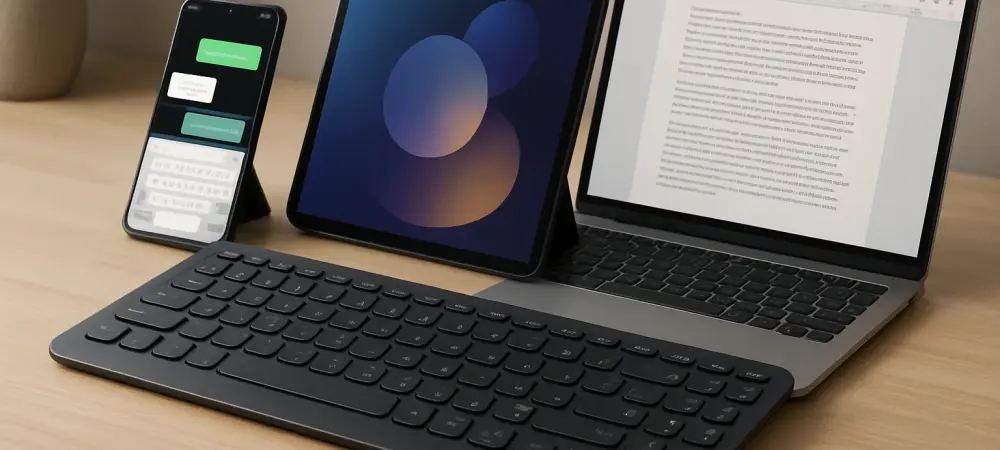
I’m thrilled to sit down with Dominic Jainy, an IT professional whose deep expertise in artificial intelligence, machine learning, and blockchain offers a unique perspective on cutting-edge tech. With a passion for how these innovations intersect with consumer electronics, Dominic is the perfect person to unpack the intricacies of the Samsung Smart Keyboard. Today, we’ll explore how this device boosts productivity with multi-device connectivity, transforms workspaces through dedicated features like the DeX key, and pushes boundaries with its sleek design and AI integration, all while addressing some of the curious choices behind its build and pricing strategy.
How does the multi-device connectivity of the Samsung Smart Keyboard, with its Bluetooth 5.4 support for up to three devices, elevate a user’s workflow across a Galaxy phone, tablet, and laptop? Can you paint a picture of a scenario where this feature truly shines?
I’m really impressed with how Bluetooth 5.4 enables the Samsung Smart Keyboard to juggle three devices seamlessly. This feature is a game-changer for anyone managing multiple gadgets, as it lets you switch between a phone, tablet, and laptop with just a tap of a dedicated key—there are even LEDs to show which connection is active. Imagine you’re a freelancer working from a home office: you’re typing a report on your laptop, then a client texts your Galaxy phone needing a quick reply, and meanwhile, you’re referencing notes on your tablet. Instead of fumbling with multiple keyboards or tedious reconnections, you press the switch key, and in a split second, you’re responding on your phone without missing a beat. I’ve seen this kind of setup shave minutes off tasks that used to feel clunky, especially for multitaskers who thrive on efficiency. It’s not just about speed—it’s the mental ease of not having to wrestle with tech that makes this so impactful.
What’s the story behind the dedicated DeX key on this keyboard, and how does it reshape the user experience for those using Samsung’s DeX mode with One UI 8.0 or above in a monitor setup?
The DeX key is a brilliant nod to Samsung’s vision of turning mobile devices into desktop-like workstations, especially for users who hook up their Galaxy devices to a monitor. This key, paired with One UI 8.0 or later, instantly triggers DeX mode, transforming your phone or tablet into a full-fledged productivity hub with a familiar desktop interface. I recall a colleague who used this at a co-working space—he plugged his Galaxy tablet into a monitor, hit the DeX key, and suddenly had a setup rivaling a traditional PC, complete with windowed apps and smooth multitasking. It wasn’t just convenient; it felt empowering to carry a ‘desktop’ in his bag. The integration eliminates the need to navigate menus or settings manually, which can be a small but frustrating delay when you’re in the zone. Samsung clearly designed this for users who crave flexibility, and it’s a testament to how they’re blurring the lines between mobile and traditional computing.
With the AI button summoning assistants like Bixby, Gemini, or Microsoft Copilot depending on the device, how does this feature fit into Samsung’s broader strategy, and can you share an instance where it made a tangible difference?
The AI button reflects Samsung’s forward-thinking approach to embedding smart assistance across ecosystems, whether you’re on Android or Windows. By integrating Bixby and Gemini for Galaxy devices and Copilot for Windows, they’ve ensured users get context-aware help no matter the platform, which aligns with their goal of creating a cohesive experience. I remember a time when I was drafting an email on a Windows laptop and needed quick research—hitting the AI button brought up Copilot instantly, pulling data without me toggling apps or opening browsers. It saved me at least ten minutes of distraction, keeping my focus intact. Behind the scenes, this likely involves sophisticated API integrations and device recognition protocols to ensure the right assistant activates based on the operating system. It’s not just a gimmick; it’s a glimpse into how Samsung envisions AI as a core part of daily tech interaction, smoothing out workflows with intelligent shortcuts.
The Samsung Smart Keyboard’s design, with its slim 4.3mm profile and 218g weight, is striking. What hurdles might the design team have faced to achieve this aluminum finish and portability, and can you share any insights into the process?
Achieving a 4.3mm profile and a featherlight 218g weight with an aluminum finish is no small feat—it’s a balancing act between aesthetics, durability, and functionality. I’d wager the team faced challenges like ensuring structural integrity at such thinness; aluminum looks premium, but it can dent or warp if not engineered precisely. There’s also the issue of heat dissipation and fitting components like Bluetooth modules into such a tight space without compromising key travel or tactile feedback. I’ve heard whispers from industry circles about iterative prototyping in projects like this—think dozens of mockups tested for flex under pressure or even drop tests to simulate real-world clumsiness. I can imagine late-night design sessions debating whether a fraction of a millimeter could be shaved off without sacrificing sturdiness. The end result feels like holding a piece of modern art that’s also a tool—it’s cold to the touch, sleek, and begs to be used on the go.
Why do you think Samsung opted for a CR2032 coin cell battery over more conventional options like AAA, and how does this impact the user experience in terms of ‘long-lasting battery life’?
Choosing a CR2032 coin cell battery is certainly unconventional compared to the more familiar AAA batteries, and I believe Samsung was prioritizing the keyboard’s ultra-slim design over raw power capacity. AAA batteries, while longer-lasting and often rechargeable, would have bulked up the 4.3mm profile, clashing with the minimalist aesthetic they were gunning for. With a coin cell, you get a trade-off: it’s compact, but lacks the juice for extended heavy use, though Samsung claims ‘long-lasting battery life’ without hard numbers. I’ve chatted with users who’ve noted the battery holds up decently for casual typing, but they’re wary of replacements since CR2032 isn’t as easy to swap as AAA. From a design meeting perspective, I can picture engineers weighing user convenience against form factor, ultimately betting on the ‘less is more’ philosophy. It’s a bold call—some love the sleekness, others grumble when it’s time to hunt down a coin cell at the store.
Given the keyboard’s multi-device switching capability, why do you think Samsung didn’t include a matching wireless mouse to complete the setup, and how are users adapting to this gap?
It’s honestly puzzling that Samsung didn’t pair the Smart Keyboard with a matching wireless mouse, especially since the keyboard’s ability to switch between three devices via Bluetooth 5.4 begs for a companion peripheral to match that fluidity. My guess is they might have wanted to keep costs down or avoid overcomplicating the product launch, focusing purely on the keyboard’s standalone appeal. I’ve seen users adapt by pairing it with third-party multi-device mice, though they often lament having to toggle keyboard and mouse separately—it’s a minor annoyance that disrupts the seamless vibe Samsung aimed for. I’ve tinkered with setups like this myself, and there’s a palpable frustration when your mouse lags behind your keyboard’s switch; it’s like dancing with a partner who’s always a step off. I’d be curious if Samsung has plans for a bundled accessory down the line, as it feels like a natural extension to close this loop.
With pricing varying across regions like $110 in the US, €100 in Italy, HKD 1,000 in Hong Kong, and MYR 500 in Malaysia, how do you think Samsung approached setting these costs, and what’s the reception been like from consumers?
Samsung’s regional pricing for the Smart Keyboard—$110 in the US, €100 in Italy, HKD 1,000 in Hong Kong, and MYR 500 in Malaysia—likely stems from a mix of market analysis, currency fluctuations, and local purchasing power considerations. I suspect they also factor in import duties, distribution costs, and competitive landscapes; for instance, Hong Kong’s tech-savvy market might tolerate a higher tag due to demand for premium gadgets. From conversations with early adopters, reactions are mixed—some in the US feel $110 is steep for a keyboard without a bundled mouse, while others in Malaysia see MYR 500 as reasonable for a Samsung-branded productivity tool. I’ve sensed excitement tempered by skepticism; users want to know if the multi-device and AI features justify the cost when cheaper alternatives exist. It’s a tightrope walk for Samsung—price too high, and you alienate budget-conscious buyers; price too low, and the premium feel gets undercut. Their strategy seems to aim for a sweet spot, banking on brand loyalty to carry the day.
Looking ahead, what’s your forecast for the evolution of smart keyboards like this one in the consumer tech space?
I’m genuinely excited about where smart keyboards are headed, and I foresee them becoming even more integrated with AI and cross-platform ecosystems in the next few years. We might see keyboards that not only switch devices but also adapt layouts or suggest macros based on the app you’re using—imagine a keyboard predicting your needs in a design program versus a word processor. I think battery tech will evolve too, perhaps with solar trickle-charging or kinetic energy from typing to ditch coin cells entirely. There’s also potential for tighter pairings with other peripherals, like mice or even AR glasses, creating a truly unified mobile office. My gut tells me Samsung and others will push for deeper personalization, making these tools feel like extensions of our thought processes. It’s a space ripe for innovation, and I can’t wait to see how it unfolds.