

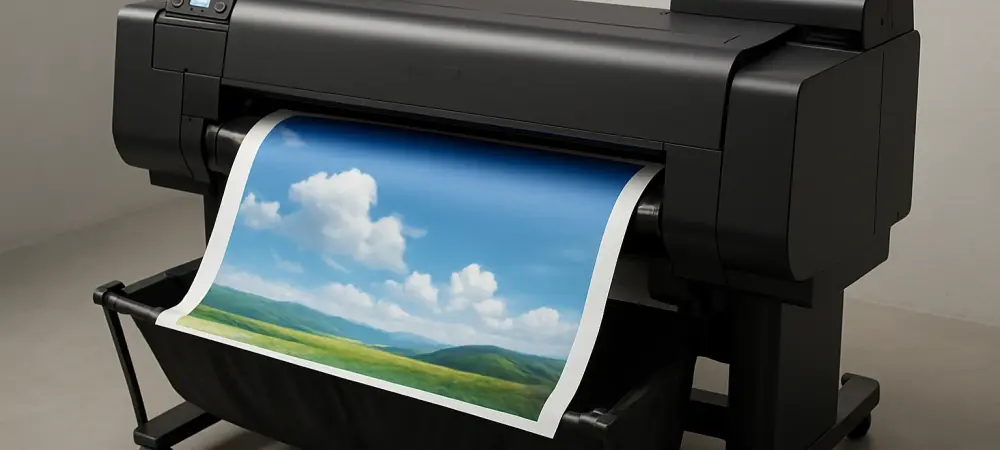
Introduction to Wide-Format Printing Needs
Imagine a small business or school needing to produce large posters, detailed maps, or vibrant banners on a tight budget, yet struggling with the high costs and complexity of traditional wide-format printers. This scenario underscores a common challenge in environments where impactful visual outputs are essential, but resources are limited. Wide-format printers, designed to handle paper sizes up to 24 inches or more, play a critical role in such settings, offering solutions for everything from educational materials to retail displays.
The purpose of this FAQ is to explore whether a specific device stands out as the ideal choice for these needs, focusing on its features, performance, and value. By addressing key questions about functionality, cost-efficiency, and usability, this discussion aims to guide potential buyers through the decision-making process. Readers can expect clear, actionable insights into how this printer meets diverse demands, setting the stage for informed choices in a competitive market.
This exploration will delve into critical aspects such as design, print quality, and maintenance, ensuring a comprehensive understanding of what this device brings to the table. Each section is crafted to answer pressing concerns with detailed explanations and practical examples. The goal is to equip readers with the knowledge needed to assess if this printer aligns with their specific operational requirements.
Key Questions About the Canon imagePROGRAF TC-21M
What Makes This Printer Unique in the Wide-Format Market?
In a market saturated with print-only wide-format devices, the multifunction capability of this printer sets it apart by integrating printing, scanning, and copying in a single unit. This design addresses the challenge of needing multiple devices for different tasks, which can be both costly and space-consuming for small businesses or educational institutions. The ability to scan and enlarge documents directly on the device, without requiring a separate computer, streamlines workflows in environments like retail shops or classrooms.
The standout feature lies in its capacity to handle 24-inch paper rolls while also supporting smaller cut sheets, catering to a variety of output needs from banners to standard documents. Such versatility ensures users can tackle diverse projects without switching equipment. This all-in-one approach is particularly valuable for those seeking efficiency and simplicity in their printing operations.
Moreover, the inclusion of a flatbed scanner enables quick production of poster-sized outputs, such as A0 enlargements from A4 originals, making it a practical tool for on-demand tasks. This unique combination of features positions the device as a niche solution, especially for users prioritizing integrated functionality over standalone printing power. The design reflects a clear intent to serve specific, often underserved, market segments with tailored capabilities.
How Cost-Effective Is the Ink System for Large-Volume Printing?
Cost efficiency remains a pressing concern for users of wide-format printers, where large outputs can quickly drive up expenses. This device tackles this issue head-on with a refillable ink tank system, a departure from traditional cartridge-based models that often incur higher running costs. The initial package includes four 70ml ink bottles, capable of producing approximately 6,000 A4 pages, offering significant savings upfront for high-volume users.
For small businesses or schools printing posters and graphics regularly, this system reduces the frequency of ink purchases, easing budget constraints over time. While replacement ink from the manufacturer can be relatively expensive, the availability of compatible third-party options at a fraction of the cost provides a viable alternative. This flexibility allows users to balance quality and affordability based on their needs.
The focus on economical operation extends to the long-term value, as the ink tank design minimizes waste compared to cartridges, aligning with cost-conscious priorities. This approach is especially beneficial in settings where large-format printing is a recurring necessity rather than an occasional task. Users can plan their printing budgets more effectively, knowing that consumable costs are kept in check through this innovative system.
Is the Print Quality Suitable for Professional Outputs?
Print quality is a critical factor when evaluating any printer, particularly for wide-format devices used in professional or educational contexts. This model delivers a resolution of 2,400 x 1,200 dpi, producing detailed and vibrant outputs ideal for graphics, line drawings, and posters on plain paper. The pigment inks used are smudge-resistant and quick-drying, ensuring durability for functional applications.
However, it’s important to note that this printer is not optimized for high-end photo printing, as its color gamut falls short of specialized photo printers. For users needing precise color reproduction for artistic purposes, this limitation may steer them toward other options. Yet, for maps, CAD drawings, and promotional materials, the quality meets and often exceeds expectations for its price range.
The performance shines in practical scenarios, such as producing clear, readable enlargements for classroom displays or retail signage. This makes it a reliable choice for environments where the focus is on clarity and utility rather than artistic finesse. Potential buyers should align their expectations with the device’s strengths in functional printing to ensure satisfaction with the results.
How User-Friendly Is the Setup and Operation?
Ease of use can make or break the experience with a wide-format printer, especially for non-technical users in small offices or schools. This device features a large, intuitive touchscreen interface that simplifies tasks like scanning, copying, and printing directly from the unit. The straightforward navigation reduces the learning curve, allowing users to operate it with minimal training.
Setup, while requiring some effort due to the printer’s substantial size and weight of 34 kg (about 75 lbs), is supported by clear instructions and a user-friendly design. The included ink bottles have keyed spouts to prevent errors during installation, and the shaftless roll holder makes paper loading accessible. Additionally, a mobile app offers remote control and status monitoring, enhancing flexibility for busy environments.
Bundled software, such as tools for creating posters, further boosts accessibility by enabling customization without external programs. Despite the physical challenges of initial placement, the operational simplicity ensures that daily tasks remain hassle-free. This focus on usability caters to a broad audience, ensuring that even those unfamiliar with wide-format printing can utilize the device effectively.
What Are the Limitations in Design and Features?
No device is without drawbacks, and understanding these limitations is essential for making an informed purchase decision. One notable constraint of this printer is the absence of an output tray, meaning users must manually catch prints unless an optional stand is purchased at additional cost. This can be inconvenient in high-volume settings where prints are frequent.
Another limitation is the lack of auto-duplex printing, which means double-sided outputs require manual intervention. For users accustomed to this feature in standard printers, this omission may feel like a step backward, especially for document-heavy tasks. Additionally, print speeds are moderate, with an A1 poster taking nearly two minutes in standard mode, potentially slowing down time-sensitive projects.
These design choices reflect a prioritization of core functionality over convenience features, aligning with the target audience’s likely focus on cost and basic performance. While not deal-breakers, these aspects should be weighed against specific operational needs. Users requiring faster output or automated features may need to consider supplementary equipment or alternative models to address these gaps.
How Does Maintenance Impact Long-Term Use?
Maintenance is a key consideration for any inkjet printer, as it directly affects reliability and longevity. This device follows typical inkjet maintenance patterns, requiring occasional nozzle cleaning cycles to prevent clogging, particularly if left unused for extended periods. Such cycles are straightforward to initiate, ensuring minimal disruption to regular use. Replacement parts, such as the printhead and maintenance cartridge, are reasonably priced, supporting affordability over the printer’s lifespan. However, the cost of branded ink replacements can add up, though compatible alternatives offer a budget-friendly workaround. This balance allows users to manage expenses while maintaining performance, a crucial factor for sustained operation.
For environments with consistent printing needs, regular use can mitigate some maintenance issues like clogging, while periodic checks ensure optimal functionality. The design facilitates easy access to components, reducing downtime during upkeep. Potential buyers should factor in these maintenance demands when planning for long-term integration into their workflows, ensuring they are prepared for routine care.
Summary of Key Insights
This discussion has unpacked essential aspects of a notable wide-format printer, addressing its unique multifunction capabilities, cost-effective ink system, and reliable print quality for functional outputs. The user-friendly interface and setup process stand out as significant advantages, making it accessible to a wide range of users, from small businesses to educational institutions. Limitations like the lack of an output tray and auto-duplex printing, alongside moderate print speeds, were highlighted as considerations for prospective buyers. The recap of maintenance needs and design constraints provides a balanced view, emphasizing the printer’s suitability for specific use cases over universal application. Its strengths in affordability and versatility position it as a compelling option for niche markets needing large-format solutions without excessive complexity. Key takeaways include the importance of aligning expectations with the device’s focus on practical, cost-conscious printing rather than high-end or high-speed outputs.
For those seeking deeper exploration, additional resources on wide-format printing trends or comparisons with other models in the same category can offer further clarity. Consulting manufacturer specifications or user forums may also provide insights into real-world applications. This summary serves as a foundation for evaluating whether this printer meets individual or organizational needs in a competitive landscape.
Final Thoughts on Choosing the Right Printer
Reflecting on the insights shared, it becomes evident that this wide-format printer carves a distinct niche by blending multifunctionality with affordability, addressing specific demands that many alternatives overlook. The journey through its features, limitations, and practical applications paints a picture of a device tailored for environments where budget and utility take precedence over speed or advanced extras. This evaluation offers a lens through which potential users can assess its fit for their unique contexts.
Looking ahead, the next step involves a careful consideration of operational priorities—whether the focus rests on cost savings, ease of use, or specific output types like posters and graphics. Exploring compatible ink options or investing in the optional stand to address design limitations emerges as a practical solution to enhance the experience. A thorough assessment of printing volume and maintenance capacity also proves essential to ensure seamless integration into daily routines.
Beyond immediate decisions, staying informed about evolving printer technologies and accessories could open doors to optimizing performance over time. Engaging with user communities or manufacturer support for tips on maximizing the device’s potential is a proactive move to tackle any challenges that arise. Ultimately, aligning this printer’s strengths with specific needs promises a rewarding investment for those in search of a reliable wide-format solution.