

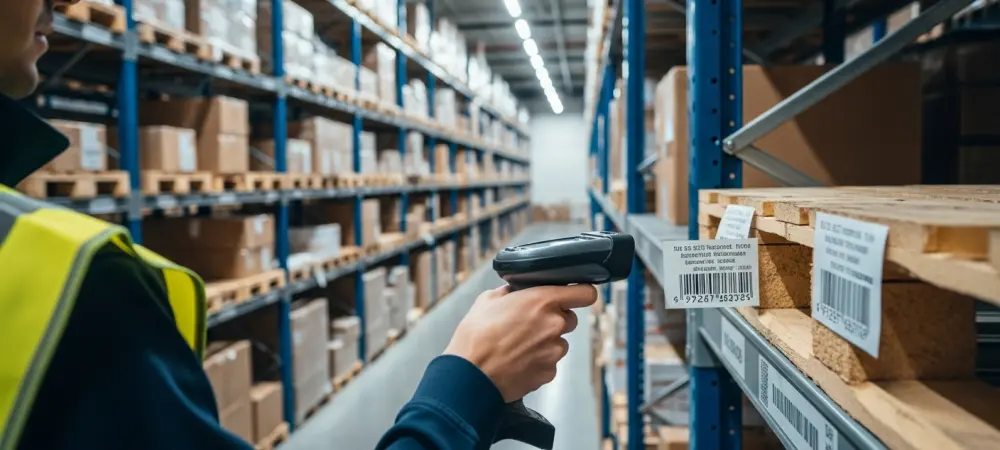
In the modern industrial landscape where speed and precision dictate market survival, many warehouses still grapple with the invisible friction of manual data entry and paper-based tracking systems. Even with advanced ERP systems like Microsoft Dynamics 365 Business Central in place, the reliance on handwritten notes and physical tickets creates a significant disconnect between the actual stock on the shelves and the digital records stored in the cloud. This discrepancy often manifests as “phantom inventory,” where items appear to be in stock but cannot be found, or as shipping delays caused by the time lag between a physical movement and its administrative record. As 2026 progresses, the demand for instantaneous data availability has moved from a competitive advantage to a fundamental operational requirement for any organization handling physical goods. Companies that fail to bridge this gap find themselves struggling with dissatisfied customers, inefficient labor utilization, and inflated carrying costs due to safety stock buffers. The introduction of mobile barcoding serves as the critical bridge, transforming passive databases into active, real-time reflections of the physical warehouse environment. By moving the point of data entry to the exact moment and location where the physical transaction occurs, businesses can eliminate the traditional errors associated with transcription and memory-based logging.
1. Overview of Inventory Accuracy Challenges
The persistent challenge of maintaining inventory accuracy is frequently rooted in the inherent limitations of paper-based workflows which rely on delayed human transcription. When a warehouse operator receives a shipment and records the details on a physical packing slip, several hours or even days might pass before that information is manually typed into the central ERP system. During this window of time, the system remains oblivious to the new arrivals, leading to missed sales opportunities or redundant procurement orders for items that are already on-site but unrecorded. Furthermore, manual entry is prone to simple yet devastating human errors, such as misreading a serial number or transposing digits in a quantity field. These small mistakes accumulate over time, leading to a degraded database that no longer reflects reality, eventually requiring expensive and time-consuming manual reconciliations to rectify the situation. The ripple effects of these inaccuracies can paralyze production schedules and lead to broken promises to customers who expect their orders to be fulfilled exactly as the online storefront suggested.
In contrast, the adoption of mobile barcode scanning directly integrated with Microsoft Dynamics 365 Business Central provides a mechanism for real-time verification at every touchpoint. This technology ensures that data capture occurs during the receiving, picking, counting, and shipping stages, which virtually eliminates the lag between physical action and digital recognition. By requiring a scan for every movement, the system forces a physical validation of the item, bin location, and quantity, preventing the “shortcut” mentality that often leads to inaccuracies in manual systems. The immediate synchronization of this data means that sales representatives, procurement officers, and management teams have access to the exact status of the warehouse at any given second. This transparency allows for more aggressive inventory management strategies, such as just-in-time replenishment, because the trust in the underlying data is high enough to support critical decision-making without the need for constant physical verification. Ultimately, the goal is to create a seamless feedback loop where the physical world and the digital twin are always in perfect alignment, reducing operational overhead.
2. Free Extensions for Business Central
Expanding the functionality of a core ERP system often involves navigating a complex landscape of paid add-ons, yet there are several sophisticated extensions available for Business Central that require no initial capital outlay. One of the most impactful categories includes advanced planning and forecasting tools that leverage modern artificial intelligence models to predict purchasing needs and sales trends with high precision. These tools replace the standard, often insufficient, planning worksheets found in the base system, allowing warehouse managers to automate the generation of replenishment orders based on historical data and current market fluctuations. Additionally, specialized barcode generator tools enable the direct printing of complex formats like GS1 or Data Matrix codes from within the ERP. This ensures that every item entering the facility is immediately labeled with a high-density barcode that stores far more information than traditional linear codes, including batch numbers and expiration dates, which simplifies the downstream scanning process for the entire team.
Furthermore, the ecosystem of free utilities extends into logistical operations and document management, providing a robust foundation for small to mid-sized enterprises. Document management extensions allow for seamless integration with platforms like SharePoint, enabling users to drag and drop files such as quality certifications or vendor invoices directly into the Business Central interface. This creates a centralized repository where even non-licensed users can access critical documentation associated with specific orders or items. For logistics, free shipping utilities offer access to discounted rates with major domestic carriers while integrating real-time tracking and label generation into the warehouse workflow. Perhaps most importantly, entry-level warehouse management systems (WMS) provide the core infrastructure for scanning-based receiving and picking without the cost of a full-scale enterprise license. These free versions act as a gateway to automated data collection, proving the value of the technology before an organization commits to more advanced configurations like license-plating features or manufacturing-specific material tracking modules.
3. Strategies for Implementing Automated Data Collection
When an organization decides to adopt a mobile barcoding system, it typically navigates one of three primary strategic paths to ensure the technology delivers the desired results. The first approach involves adjusting internal workflows to align with the software’s standardized processes. Often, existing warehouse procedures are artifacts of legacy systems or “tribal knowledge” that may not be the most efficient way to operate in a digital environment. By adopting the standard workflows presented by a modern WMS, businesses can leverage industry best practices and minimize the need for custom development. This standardization often leads to a faster implementation timeline and ensures that future software updates can be applied without breaking custom code. It requires a level of organizational flexibility but often results in a more streamlined operation that is easier to scale and maintain over the long term, as the software dictates the most logical sequence of events for a high-volume warehouse.
The second and third strategies cater to businesses with highly specialized needs or those looking to fill specific functional gaps. Some companies choose to customize the software to support established, high-efficiency business practices that provide them with a competitive edge. This path acknowledges that certain niche operations require unique logic that standard software might not accommodate out of the box. Alternatively, many organizations utilize supplemental tools to bridge functional gaps, such as replacing manual spreadsheets with advanced counting modules. This is particularly common in areas like inventory auditing and cycle counting, where the standard Business Central capabilities may lack the depth required for complex multi-bin environments. By selecting specific modules to handle these heavy-lifting tasks, companies can maintain the integrity of their primary ERP while gaining specialized functionality for their most challenging warehouse operations. Regardless of the path chosen, the ultimate objective remains the same: ensuring that the technology serves the warehouse staff rather than becoming a burden to their productivity.
4. Barcoding and Hardware Essentials
The technical foundation of any mobile data collection system rests on the barcode standards and the hardware used to read them. Modern systems must support a wide array of barcode formats, ranging from simple manufacturer-applied UPC codes to complex vendor labels and internationally recognized GS1 formats. GS1 barcodes are particularly valuable because they can encode multiple data points—such as the Global Trade Item Number, lot number, serial number, and expiration date—into a single scan. This significantly reduces the time an operator spends interacting with the device screen, as one scan can populate several data fields simultaneously. In scenarios where barcodes are missing or damaged, advanced scanning software now utilizes Optical Character Recognition (OCR) to capture human-readable text directly from labels. This ensures that the workflow is not interrupted just because a printer malfunctioned at a supplier’s facility, allowing for a continuous flow of data even under less-than-ideal physical conditions.
Selecting the right hardware is equally critical to the success of a barcoding initiative, as the device must match the physical demands of the warehouse environment. Android-based handhelds have become the industry standard due to their versatility and the robust ecosystem of ruggedized options available from manufacturers like Zebra or Honeywell. These devices often feature integrated high-speed scan engines that can read codes from several feet away, even in low-light conditions. For managers or supervisors who require more screen real estate to view complex data sets, ruggedized tablets offer a middle ground between portability and data visibility. Meanwhile, for high-intensity picking operations, wearable scanners that mount to the back of the hand or on a finger provide a hands-free experience, allowing workers to use both hands for lifting and moving boxes while still maintaining real-time tracking. The choice of hardware should always be dictated by the specific tasks being performed, balancing factors like battery life, ergonomics, and the necessity for rugged protection against drops and spills.
5. Primary Application Features
A comprehensive mobile barcoding solution for Business Central provides a suite of tools designed to manage the entire lifecycle of inventory within a facility. At the most basic level, product lookups allow any staff member to scan an item and immediately see its current quantity on hand, its various storage locations, and any pending sales or purchase orders associated with it. This eliminates the need for workers to walk back to a central terminal to check stock levels, saving countless hours of unproductive travel time. Complementing this is the bin inquiry feature, which allows users to scan a specific storage area to see a detailed breakdown of its contents, including any license plates or pallets currently assigned to that space. These foundational tools provide the visibility necessary for day-to-day warehouse management, ensuring that every employee has the information they need to be effective without constant supervision or reliance on memory.
Moving beyond simple lookups, the system facilitates complex operational tasks such as stock audits, inbound logistics, and manufacturing support. Stock audits can range from basic spot checks to advanced cycle counts that satisfy rigorous financial reporting requirements. For inbound logistics, the system handles the receipt and storage of incoming goods, guiding the user through the process of assigning items to their optimal storage bins based on pre-defined rules. Internal movements are managed with equal precision, ensuring that when a product is moved from a bulk area to a picking face, the change is recorded instantly. In manufacturing and assembly environments, the system records material consumption against production orders and tracks the output of finished goods in real time. This is particularly useful for kitting processes, where multiple components are assembled into a single stock-keeping unit. Advanced features like license plating further enhance efficiency by grouping multiple items onto a single pallet, allowing an entire load to be moved or shipped with a single scan.
6. Step-by-Step Receiving Process
Processing incoming shipments effectively is the first line of defense against inventory inaccuracies, and the mobile barcoding system simplifies this through a structured workflow. To begin processing incoming goods, the warehouse operator first accesses the relevant document by opening the purchase order or warehouse receipt directly on the handheld device. This initial step ensures that the worker is working with the most current data from Business Central and knows exactly what is expected from the vendor. Once the document is open, the user can select a display mode—such as grid, card, or tile view—depending on the size of their device and the complexity of the shipment. A grid view might be preferred for long lists of items, while a card view provides more focus for high-value shipments where detail is paramount. After the interface is configured, the operator identifies the item by scanning the product barcode or utilizing OCR to read printed text if a barcode is not present, ensuring a 100% match between the physical item and the digital record.
The next phase of the receiving process focuses on capturing specific tracking data and documenting the physical condition of the goods. For items requiring higher levels of traceability, the operator inputs or scans lot numbers, serial numbers, and expiration dates as they are pulled from the truck. This granular data is essential for industries with strict regulatory requirements, such as food or pharmaceuticals. If the shipment arrives with damaged packaging, the operator can use the “Take Picture” feature on the handheld to attach a photograph directly to the receiving record in Business Central. This provides immediate proof of damage for claims against the carrier or vendor, eliminating the need for separate digital cameras or manual email trails. Finally, the operator confirms the quantity received by entering the amount on the screen, which triggers an immediate update in Business Central. This real-time posting makes the stock available for sales orders or production consumption the moment it touches the warehouse floor, significantly reducing the “dock-to-stock” cycle time.
7. Step-by-Step Picking Process
The outbound picking process is where speed and accuracy have the most direct impact on customer satisfaction, and the mobile system optimizes this through a logical sequence of steps. To initialize the pick, the warehouse worker opens the assigned warehouse pick or sales order on their handheld, which presents them with a prioritized list of items to be retrieved. The system can be configured to guide the worker through the warehouse using the most efficient path, minimizing travel time and reducing physical fatigue. Once the worker reaches the first pick location, they must verify the location by scanning the bin barcode. This step is a critical safeguard that prevents items from being pulled from the wrong location, which is a common source of inventory “drift.” By forcing a scan of the bin, the system ensures that the physical move matches the digital instruction, maintaining the integrity of the bin-level inventory records throughout the busy picking shift.
After verifying the location, the worker must then validate the product by scanning the item barcode to confirm the correct unit is being pulled for the order. This double-verification—first the bin, then the item—virtually eliminates the risk of shipping the wrong product to a customer. Once the item is validated, the operator records the movement by entering the quantity picked from the bin. If the item is tracked by serial or lot number, the system will prompt for those specific scans at this moment, ensuring that the exact units leaving the facility are recorded. The final step involves finalizing the package, which may involve using license plating features to associate several picked items with a single shipping container or pallet. Integration with shipping modules allows for the immediate generation of carrier labels and tracking information, completing the transaction and updating Business Central to reflect that the items are no longer in stock and are instead in transit to the customer, thereby closing the loop on the outbound shipment.
8. User Interface Options
A mobile barcoding system is only as effective as its usability, which is why offering diverse user interface options is essential for catering to different warehouse roles and device types. The Grid View is a compact list designed for high-speed warehouse operations where workers need to see multiple items at once. This view is ideal for experienced staff who are familiar with the product catalog and need to move through long lists of picks or receipts quickly. In contrast, the Tile View offers a more visual layout featuring product images and large, easy-to-tap buttons. This is particularly beneficial for workers using tablets, as the larger screen real estate allows for a more intuitive, photo-centric experience that can help reduce errors when picking items that look similar but have different specifications. By providing visual confirmation of the product, the Tile View serves as an additional layer of verification for the operator.
For tasks that require extreme focus or involve complex data entry, the Card View provides a single-entry display that guides the user through one task at a time. This interface reduces distractions by showing only the information relevant to the current item being processed, making it an excellent choice for receiving high-value goods or performing detailed quality inspections. Beyond visual interfaces, modern systems are increasingly incorporating voice-guided picking technologies. This allows workers to receive hands-free instructions through a headset while using wearable scanners, enabling them to focus their eyes and hands entirely on the task of moving physical stock. Voice guidance is especially effective in cold storage environments where wearing gloves makes interacting with a touchscreen difficult, or in high-volume e-commerce environments where every second saved in the pick-and-pack process contributes to the bottom line. These varied UI options ensure that the technology can adapt to the unique ergonomic and operational needs of any workforce.
9. Connectivity and Offline Support
Reliable connectivity is the backbone of any real-time data collection system, but the physical reality of large warehouses often includes wireless “dead spots” or occasional network outages. To combat this, advanced mobile barcoding solutions utilize a real-time synchronization strategy that maintains continuous communication with Business Central whenever a Wi-Fi or cellular network is available. This ensures that the ERP is updated the instant a scan occurs, providing the entire organization with up-to-the-second data visibility. However, for those moments when a worker moves into a corner of the warehouse with poor coverage, “store-and-forward” technology takes over. This feature allows the handheld device to locally store the scanned data and automatically retry the upload once a stable connection is re-established. This prevents data loss and ensures that the worker can continue their tasks without interruption, even if the network is temporarily unavailable, maintaining a steady flow of productivity throughout the day.
For environments where network reliability is a persistent challenge or for remote operations like field service and outdoor storage yards, a full offline mode provides a critical safety net. This capability allows users to continue complex tasks like picking and receiving during total network outages by downloading the necessary document data to the device beforehand. The worker can perform all their scans and validations locally, and once they return to a connected area, the system synchronizes all the completed transactions back to Business Central in a single batch. This level of resilience is essential for preventing warehouse shutdowns during IT maintenance or unexpected hardware failures. By decoupling the physical act of scanning from the immediate requirement of a live connection, businesses can ensure that their logistics operations remain resilient and productive regardless of the local technological infrastructure, providing peace of mind to management and operational staff alike.
10. Step-by-Step Inventory Auditing
Maintaining a high level of inventory accuracy requires a disciplined approach to physical auditing, and the mobile system provides a streamlined process for performing these counts. To execute a successful audit, the user first loads the count sheet by selecting a specific audit list or cycle count that has been assigned to them by a supervisor. This ensures that the auditor is focused only on the specific items or zones that require verification, preventing redundant work and ensuring comprehensive coverage over time. Once the list is active, the auditor must identify the area by scanning the barcode of the bin being audited. This step anchors the count to a specific physical location, ensuring that any discrepancies found are correctly attributed to the right storage space. This localized approach to auditing makes it much easier to identify the root causes of inventory errors, whether they are due to misplacement, theft, or procedural failures during the picking and receiving stages.
The actual counting process involves scanning every item found within the identified bin, rather than just manually typing in a total number. This requirement for individual scans or the validation of quantities against physical stock ensures that the auditor is physically touching each item, which is the only way to guarantee a truly accurate count. After the physical count is complete, the user submits the data, including any specific tracking numbers or lot codes found during the process. The final step in the auditing workflow is to reconcile discrepancies by comparing the handheld data against the system records in Business Central. This comparison highlights any shortages or overages, allowing management to investigate and post adjustments immediately. The transition to a mobile barcoding environment proved to be a pivotal shift for organizations seeking to master their inventory. Moving forward, stakeholders should prioritize the integration of these mobile tools to transition from a reactive posture to a proactive one, where data integrity is no longer a goal but a continuous reality. Inventory managers who adopted these protocols found that their reliance on manual spreadsheets vanished, replaced by a robust, automated system that empowered their workforce and secured their supply chain.