

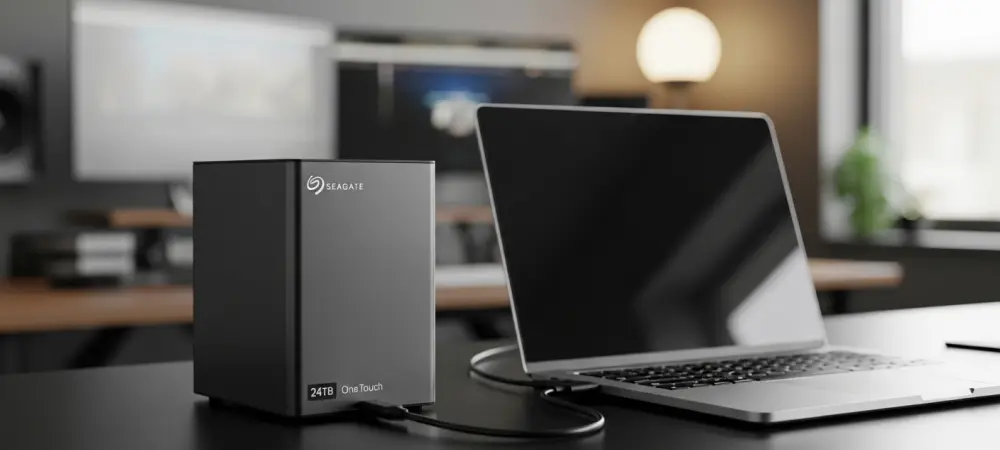
Modern creative professionals currently grapple with an unprecedented explosion of data generated by ultra-high-definition video projects and complex three-dimensional rendering tasks that quickly overwhelm standard hardware. This digital expansion has introduced a psychological phenomenon known as storage anxiety, where the fear of reaching capacity forces creators to spend valuable time deleting older files or managing a chaotic collection of small external drives. Instead of focusing on the artistic process, many editors and designers find themselves stuck in a cycle of data housekeeping that disrupts their productivity and creative flow. The introduction of high-capacity solutions like the Seagate One Touch 24TB aims to alleviate this burden by providing a singular, massive repository for professional work. By centralizing archives in one reliable location, users can maintain a cleaner digital footprint while ensuring that every draft, asset, and raw file remains accessible without the constant need for manual deletion or difficult storage decisions.
Streamlining the Creative Workspace
Modern Integration: Form and Connectivity
The transition toward minimalist and efficient workspaces has changed how peripherals are designed, moving away from the cluttered setups of previous years. The One Touch 24TB addresses this shift by utilizing a modern USB-C interface that simplifies the physical connection between the drive and the computer. Unlike traditional high-capacity desktop drives that often required proprietary cables and cumbersome power adapters, this device streamlines the user experience through standardized connectivity. This approach not only reduces the number of wires running across a desk but also ensures compatibility with the latest generation of laptops and tablets that have moved exclusively to USB-C ports. By eliminating the friction of cable management, the drive allows professionals to maintain a clean environment where the focus remains on the work rather than the hardware. This connectivity is essential for those who frequently move between different workstations and need a drive that integrates effortlessly.
Beyond the simplicity of the single-cable connection, the drive provides a stable link that supports high-volume data transfers necessary for moving large archival libraries. While the underlying technology is optimized for massive storage rather than peak solid-state speeds, the integration of USB-C ensures that the interface is never a bottleneck for the mechanical drive within. This modern connection also facilitates better power management, allowing the drive to spin up and down efficiently in tandem with the host computer’s activity. For creators who utilize a laptop as their primary workstation, having a high-capacity sidecar drive that communicates through a single port helps preserve the utility of limited input and output options. Furthermore, the inclusion of backward compatibility ensures that users with older hardware can still access their data through simple adapters, making it a versatile tool for studios that maintain a mix of new and legacy equipment during their technological transitions.
Desktop Presence: Weight and Build Quality
When dealing with high-capacity storage that houses years of irreplaceable work, the physical build quality of the device becomes just as important as the internal components. The Seagate One Touch 24TB features a substantial design, weighing approximately 2.7 pounds, which provides a level of stability that lighter drives often lack. This weight is a deliberate choice that prevents the drive from sliding across the desk when cables are adjusted or when the desk is bumped during intense work sessions. For professionals who operate in busy studio environments, the planted feel of the drive offers a sense of security and permanence. It is compact enough to be tucked behind a monitor or placed discreetly under a tablet stand, yet its physical presence suggests a level of industrial-grade durability. This balance between a relatively small footprint and a heavy-duty chassis reflects a design philosophy aimed at professional users who value hardware that feels built to last.
The aesthetic choices of the exterior casing further emphasize its role as a professional tool, featuring clean lines and a finish that complements modern aluminum-clad laptops and monitors. This focus on industrial design ensures that the drive does not look out of place in a high-end creative suite or a home office setup. Beyond mere appearance, the casing is designed to facilitate passive cooling, which is vital for maintaining the longevity of a high-capacity mechanical drive that may be running for hours during large backup tasks. The structural integrity of the housing also protects the internal platters from minor vibrations and external environmental factors. By prioritizing a sturdy build, the device avoids the flimsy feel of budget-oriented external storage, reinforcing the user’s confidence in its ability to protect valuable digital assets over the long term. This attention to physical detail ensures that the hardware remains a reliable fixture in a professional’s hardware arsenal for many years.
Managing Massive Digital Libraries
High-Capacity Archives: The 24TB Scope
The primary appeal of a 24-terabyte drive lies in its ability to hold an almost staggering amount of data, effectively ending the need for most users to constantly monitor their remaining space. To put this capacity into a practical context, the drive can store roughly 600,000 high-resolution RAW images or hundreds of hours of 4K video footage without reaching its limit. For photographers, this means an entire career’s worth of work could potentially live on a single device, organized and ready for retrieval at any moment. This massive ceiling changes the way creators interact with their files, as it removes the psychological pressure of deciding which projects are important enough to keep. Instead of spending hours auditing old folders to find a few gigabytes of space, users can simply move completed projects into the archive. This shift in workflow efficiency allows for a more comprehensive preservation of creative history, ensuring that no draft or alternate take is lost due to storage constraints. Adopting such a high-capacity solution also future-proofs a professional’s digital infrastructure against the inevitable increase in file sizes as camera technology continues to evolve. As higher bitrates and resolutions become the industry standard, the amount of space required for even a single project will continue to grow exponentially. Having a 24TB repository ensures that a creator is prepared for these shifts without needing to upgrade their storage every few months. Furthermore, this centralized approach simplifies the search for specific assets, as users no longer have to swap through multiple smaller drives to find a project from several years ago. The ability to keep a complete library online and accessible significantly reduces the friction of repurposing old content for new social media trends or retrospective portfolios. In a professional landscape where speed and access to resources are paramount, having a massive, reliable vault becomes a competitive advantage that saves both time and mental energy.
Workflow Integration: Roles and Protection
While the sheer capacity of the drive is impressive, it is essential to understand its specific role within a professional workflow as a high-volume library rather than a primary edit drive. Because the device utilizes traditional hard disk technology, it is optimized for long-term storage and reliable archiving rather than the blistering speeds required for real-time 8K video editing. In an ideal tiered storage setup, a fast solid-state drive would handle the active, high-bandwidth tasks, while the One Touch 24TB serves as the back-end vault. Once a project is finished, it can be moved to the Seagate drive to free up the expensive SSD space for the next job. This methodology ensures that the most demanding tasks have the performance they need while the bulk of the data is stored on a more cost-effective and high-capacity medium. This division of labor between drive types maximizes both performance and budget, providing a logical structure to data management that prevents hardware bottlenecks. Security and data integrity were prioritized through the inclusion of specialized software and services that protected the user’s investment from unexpected failures. The Seagate Toolkit software allowed professionals to automate their backup routines, ensuring that mirrors of important folders were updated without requiring manual intervention. This proactive approach to data safety was complemented by the Rescue Data Recovery Services, which provided a safety net in the event of hardware malfunction. Moving forward, the most effective strategy for managing digital assets involved integrating such high-capacity drives into a robust 3-2-1 backup plan, where this device served as the primary local archive. By leveraging the included Adobe Creative Cloud Pro subscription, creators successfully integrated their storage and creative software into a single, cohesive ecosystem. Professionals who adopted this centralized archival model found that they could finally move past storage anxiety and focus on expanding their creative horizons with total peace of mind.